



Hi, we’re here to help
Find the answers to all your questions.
UberEats
UberEats: I have technical issues with the Uber app
If you’re doing employed shifts for UberEats and using the Uber Driver app, you might run into some issues sometimes. Below are the main causes and how to fix them. If the problem continues, help is available.
Can't go online?
Before your first shift, make sure you’ve done the following:
- Complete the safety check: You’ll get a pop-up with a bike. Tap all the checkmarks, take a photo, and choose "software" as the issue.
- App says "contact support": Fully close the app and reopen it. That usually helps.
- App asks to pick a vehicle: Choose "bicycle" for example and continue.
- Allow permissions: Make sure you allow location access and push notifications. The app won’t work properly without them.
- Seeing ads? Just close them. They don’t affect anything.
- Still not working? Tap on the error message for more info. If you’re still stuck, follow the below steps to raise your issue via Discord.
Discord:
- Join the Amsterdam Temper group in the Discord Community: https://discord.com/invite/nNprrrfv6S
- Go to the courier-support channel (on the left)
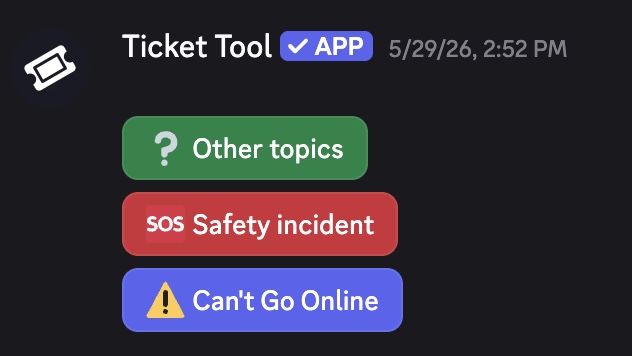
- Start a ticket by choosing what issue you need help with
UberEats: am I insured during my shift?
Doing a delivery shift for UberEats through Temper? Good news, Uber has its own insurance that covers you during those shifts.
- It covers damage you cause to other people or their property.
- You're not covered when driving a motorized vehicle, damaging your own property, or driving unsafely. Stay protected by following these road safety guidelines.
You don’t need to do anything to activate this, Uber handles it automatically. Do contact them if you want to file a claim.
Important: If you're using a motorized vehicle (like a scooter or moped), you're responsible for having your own legal insurance for it. Uber and Temper don’t cover motorized vehicles under their regular insurance.
UberEats: how do I get more shifts?
UberEats drivers are assigned to a group based on their performance in the previous week. Your group determines when you can start booking delivery shifts in Planner each week.
Drivers who consistently show up on time, complete their scheduled shifts, and maintain strong reliability metrics get earlier access to Planner.
Your group is updated every week based on three metrics:
- Shift Adherence (SA): How closely your actual online time matches the shift you booked, including late starts, early log-offs, and no-shows.
- On-Time Rate (OTR): How often you arrive at pickups and drop-offs on time.
- End of Shift Acceptance Rate (EOS AR): How often you accept deliveries that may run a few minutes past the end of your scheduled shift.
Waiting at a restaurant or for a customer won't affect your On-Time Rate. Shift Adherence is only measured during your scheduled shift hours in Planner.
The better your scores, the earlier you'll get access to book shifts. So if you'd like to pick up more shifts, keeping your scores high can help you get earlier access the following week. You got this!
Uber Eats: what bonuses can I earn during my shift?
You can earn extra bonuses during your UberEats shifts. For example, by completing a high number of deliveries during busy periods.
You can always find the latest bonus opportunities and incentive programs in the Uber Driver app or in the Discord Community under #promotions-and-incentives.
Not a member yet? Join the Amsterdam Temper group in the Discord Community.
UberEats: why is my registration for UberEats rejected?
When you apply for your first UberEats shift through Temper, we trigger UberEats' onboarding process. At that point, UberEats may still reject your registration.
Here are some common reasons why this can happen:
- You’ve had a previous UberEats account with issues.
- Incorrect or incomplete information.
- You’re already connected to another agency (like Adecco or Randstad).
If you’re not sure what went wrong or need help checking your application, feel free to contact our support team. We’re happy to help you figure it out.
UberEats: what to do if you're in an accident or emergency?
Your safety always comes first. Before you start delivering with UberEats via Temper, you'll receive a safety briefing that explains important precautions and emergency procedures.
If you're involved in an accident or find yourself in a critical situation while delivering, it's important to act quickly and take the right steps to protect yourself and others. We’re here to support you when you need help.
What to do in an emergency
If you’re in an accident or facing a life-threatening situation: Call 112 or contact the nearest hospital immediately.
- If you can’t continue working:
- If you have any urgent questions during your shift:
Emergency hotline
If you need urgent support during your shift, call 020 532 0946 (available daily from 11:00 to 00:00). This hotline is specifically for severe accidents or life-threatening situations that happen while delivering with UberEats. Please note that this line is strictly for emergencies. If you completed your shift but still need assistance, contact us via chat.
Responsible use of the emergency hotline To ensure those in real danger can get the help they need, the emergency hotline must be used only for urgent situations. Misusing this number not only delays assistance for couriers in critical need but also comes with consequences. Improper use of the hotline may result in a strike.
UberEats: what type of vehicle can I use?
When working a delivery shift for UberEats via Temper, you can decide which vehicle you want to use. But there are some important requirements depending on what you choose.
Bicycles
You can use a regular bike or an e-bike with pedal assistance for deliveries. These are the most common and straightforward options for shifts on the platform.
Motorized vehicles
If you use a scooter, moped, or other motorized vehicle, you are responsible for having valid insurance (such as a WA-verzekering in the Netherlands). These vehicles are generally not covered under Uber’s insurance. Make sure your vehicle is legally registered and meets all local traffic and safety regulations.
Your safety on the road matters. Be sure to review and follow these important guidelines before each shift.
UberEats: how do I apply for shifts?
To work Uber Eats shifts and use the Planner in the Uber Eats app, you'll first need to be onboarded for Uber Eats shifts. Once that's done, you'll be able to see all available shifts in the Planner and book or cancel them directly.
Where can I find available shifts?
All available shifts can be found in the Planner in the Uber Driver app. Here you can see:
- New shifts for the following week
- Available shifts for the current week
When do new shifts become available?
Every Wednesday you will receive a message indicating which group you are assigned to. This is based on your performance in the previous week.
The shifts for the following week are released every Friday:
- Group 1: from 10:00
- Group 2: from 13:00
- Group 3: from 16:00
You will automatically receive a notification about this in the Uber Driver app. More shifts may be added during the week, so check the Planner regularly.
How do I book a shift?
- Open the Planner in the Uber Driver app
- Select the date you want to work
- Choose the zone
- Tap the desired shift
- The shift will be confirmed and booked immediately
Want to cancel a booked shift? Simply tap the shift again.
Where do I need to be during my shift?
Make sure you are physically present in the assigned zone at the start of your shift before going online and starting deliveries.
Can I work multiple shifts per day?
Yes, that is possible. However, there must be at least a 1-hour break between two shifts.
How many hours am I allowed to work at most?
You may work a maximum of:
- 10 hours per day
- 44 hours per week
Until when can I cancel a shift?
You can cancel a shift up to 3 hours before the start of the shift at the latest.
Why can’t I see my shifts in the Temper app yet?
It may take some time before all your booked shifts appear in the Temper app.
Why do I still see shifts in the Temper app?
The shifts visible in Temper are examples. When you tap them, you will be redirected to the actual available shifts in the Planner in the Uber Driver app.
UberEats: what are the safety guidelines?
As a delivery worker for UberEats through Temper, your safety on the road is a top priority. Whether you're using a bicycle or a motorized vehicle, it's your responsibility to follow these guidelines to ensure a safe and professional experience.
- Always wear a helmet: Helmets are strongly recommended for all riders and required if you're using a motorized vehicle such as a scooter or moped. A properly fitted helmet offers essential protection in case of an accident.
- Use a safe and legal vehicle: You may use either a bicycle or a motorized vehicle for deliveries. If you're using a scooter or moped, make sure your vehicle is legally registered and that you hold a valid insurance policy (e.g. WA-verzekering in the Netherlands). Without proper insurance, you're not covered, and this could affect your ability to continue working.
- Follow traffic laws: Always obey local traffic regulations. Stop at red lights, use hand signals, yield to pedestrians, and park your vehicle safely during pickups and drop-offs. Do not block bike lanes, sidewalks, or ramps.
- Stay visible: Wear bright or reflective clothing, especially in low light or poor weather. Your vehicle should have working front and rear lights at all times.
- Keep your vehicle in good condition: Regularly check brakes, tires, lights, and general roadworthiness. A well-maintained bike or scooter reduces the risk of accidents or breakdowns.
- Avoid distractions: Never use your phone while riding or driving. If you need to check the app or navigate, pull over to a safe location first.
- Secure your deliveries properly: Make sure food is packed securely in your delivery bag and kept upright to prevent spills or damage.
- Be alert to your surroundings: Stay aware of traffic, pedestrians, and other riders. Use extra caution at intersections and in busy areas. Avoid using headphones or anything that limits your hearing or focus.
By following the safety rules, you help keep yourself and others safe while making deliveries. Remember that it is your responsibility to follow these guidelines. For more details, check out Uber’s Community Guidelines.
UberEats: how to start working UberEats shifts
To work Uber Eats shifts, you must first complete an extra verification process. Below, we'll explain how it works in four easy steps.
Good to know before! Unfortunately, it's not possible to work both UberEats shifts and employed shifts for other companies through Temper. After completing the onboarding process, your account will be set up exclusively for UberEats employed shifts.
1. Sign up for an UberEats shift
You don't need to actually work this shift, but signing up is required to get the onboarding process started. Once you've signed up, you'll receive an email with the next steps within four business days.
2. Complete the onboarding
The entire onboarding process takes place online, making it quick and easy. You'll receive all the necessary instructions by email. During onboarding, you'll need to:
- Verify your ID during an at-home appointment with someone from UberEats
- Complete an online training
3. Receive your equipment
During onboarding, you'll order your delivery equipment. To make sure you receive the correct equipment, you'll be asked which vehicle you'll be using for deliveries. You will receive:
- Bicycle or scooter helmet
- Delivery bag
- Phone mount
Within a few business days, it should be delivered. Once that’s done, you can schedule your first shifts.
4. Schedule your shifts through the Uber Driver app
The shifts you see in Temper are only intended to start the onboarding process. Once your onboarding has been completed, you'll schedule all your shifts directly through the UberDriver app.
Do you have any questions? Feel free to contact Support if anything is unclear.
