



Hi, we’re here to help
Find the answers to all your questions.
Shifts
How do flexible start and end times for freelance shifts work?
Companies can post freelance shifts without fixed times. They set an expected start and end time, which may vary by up to 3 hours from the original schedule.
How can you tell if a shift is flexible?
On the shift page, you’ll see the original times along with a note showing within which time window the start and end times may still change.
When are the times final?
The client can update and/or confirm the times once, up until the cancellation period begins. You’ll only receive an email if the client changes the times. If there are no changes, the original times apply and you won’t get an email.
Once the cancellation period starts, the times are locked in and can’t be changed anymore. Be sure to check your dashboard before the cancellation term begins so you know the final times.
Why can’t I apply for a substitute shift?
You can only take over another flex worker’s freelance shift if you both have the same VAT setup. That’s because, as a substitute, you’ll invoice the original flex worker, who invoices the client.
If invoicing goes through Finqle, the total amount must stay the same for the substitute. So if the original flex worker doesn’t charge VAT, but you do, the totals won’t match, meaning you won’t be able to take over the shift.
Invoicing without VAT
Flex workers who use the KOR scheme, or who are new to the platform and want to try out a freelance shift before applying for a VAT ID, don’t charge VAT.
They can cover shifts for each other, but they can’t substitute for flex workers who do charge VAT.
Important: Don’t just switch the KOR setting on or off in your profile to make a substitution work. This isn’t allowed by the Belastingdienst (Tax Administration) and could lead to a fine.
This is how it works, from registration to payment.
On our platform, you can find both freelance and employed shifts. You can recognise them by the icon on the shift page. Much is the same, but a few things work slightly differently. Read below how freelance and employed shifts work, from registration to payment.
What is the minimum and maximum length of an employed shift?
According to the Arbeidstijdenwet (working hours act, or WHA), the following rules apply:
Maximum shift length
A standard shift can last up to 12 hours. But, if you’re working a night shift, the maximum length is 10 hours.
Minimum shift length
Although unlikely, a shift of just 1 hour can be published by the company and worked by you.
If you have any questions or concerns about how long your shift is, feel free to check in with the hiring company to make sure everyone’s on the same page and everything follows the rules.
These rules do not apply to freelance shifts.
How do I apply for a shift?
On the platform, you'll find both freelance and employed shifts.
How to apply
- Go to Shifts at the bottom of the app. You’ll see two types of shifts:
- Open a shift and read the description carefully. This helps you make sure it's the right fit and avoids no-shows.
- Select the date(s) you're available.
- Choose how long your application should remain active. If you haven't been selected by then, your application will automatically be withdrawn.
- Submit your application and confirm your skills.
And done! Your application has been submitted.
Your first shift
If this is your first shift, you'll be asked to upload your ID. For an employed shift, you'll also need to sign the framework agreement.
When will I be accepted?
We ask clients to respond to applications no later than 24 hours before the shift. But, you may also be selected last minute. As long as your application is active, you're confirming that you're available to work. If you're no longer available, withdraw your application in time to avoid a no-show.
What is the difference between ‘not chosen’ and ‘rejected’?
You’ll see ‘not chosen’ when the company chooses someone else for the shift. In that case, your application is automatically withdrawn.
The ‘rejected’ status appears when the company has viewed your profile, but then decides to click ‘don’t choose’.
A rejection isn’t always personal. It could simply be that they are waiting for an application from another flex worker, or the shift is cancelled.
Can I restore my application for a shift?
Have you withdrawn your application but still want to work the shift? Simply find the shift in the ‘Find work’ overview and apply again!
Why am I not being chosen for a shift?
Not chosen for a shift? Bummer, but don’t worry! It’s usually nothing personal. Since the company posting the shift makes the choice themselves, we can never say exactly why someone is chosen or not.
Possible reasons
- Another flex worker who applied has already worked with this company before or is part of their flexpool.
- There were many applications, and they eventually had to make a choice.
- The shift was no longer needed.
Boost our chances
You can boost your chances of being chosen by creating an attractive profile that reflects who you are and what you can do!
Avoid last-minute acceptance
And don’t forget to keep an eye on your open applications and withdraw them if you no longer want to wait. This way, you avoid being accepted last-minute when you’re no longer available. As this may have consequences.
Can I apply for multiple shifts that take place at the same time?
It’s smart to apply for multiple shifts. That way, you increase your chances of being chosen. No worries, if you get accepted for a shift while you still have other applications for the same date and time, your overlapping shifts are automatically cancelled.
Shifts applications that do not overlap
You can still be accepted for shifts that don’t overlap. To avoid being accepted for two shifts on the same day, it’s important that you cancel your other applications yourself.
For shifts at different companies, there must always be at least 59 minutes in between, giving you enough time to get to your next shift.
What are the required skills?
Each shift includes a list of skills the company expects you to have. Make sure to read them carefully and only apply for shifts when you’re confident you meet those requirements.
Rating
If you don’t meet expectations during a shift, there’s a good chance you’ll receive a lower rating. Even more importantly, it can leave both you and the company you worked at disappointed.
Not sure if a shift is the right fit for you? It’s better to pick another one that you feel more confident about.
No-show
A company can also send you home and mark you as a no-show if you don’t meet the requirements listed in the shift description. Besides the required skills, you’ll also find information on how to present yourself, such as any dress code requirements. Make sure to follow these instructions.
Can I try a freelance shift without VAT ID?
Not sure if freelancing is something for you? You can work one freelance shift without a VAT ID. If you decide to continue as a freelancer, you’ll need to apply for a VAT ID.
How often can I work employed shifts?
In the Netherlands, there are rules about how much you can work as an employee. These rules cover things like maximum working hours, breaks, and rest periods.
If you work too many employed shifts, you might not be able to apply for a shift, or a shift you've already picked up could be withdrawn automatically.
The rules below apply to all employed shifts on the platform, not freelance shifts.
Maximum employed shift length
A shift can never be longer than 12 hours, and during your shift, you’re entitled to a break. The length of the break depends on how long you’re working and these breaks can be split up during your shift, as long as the total time is met.
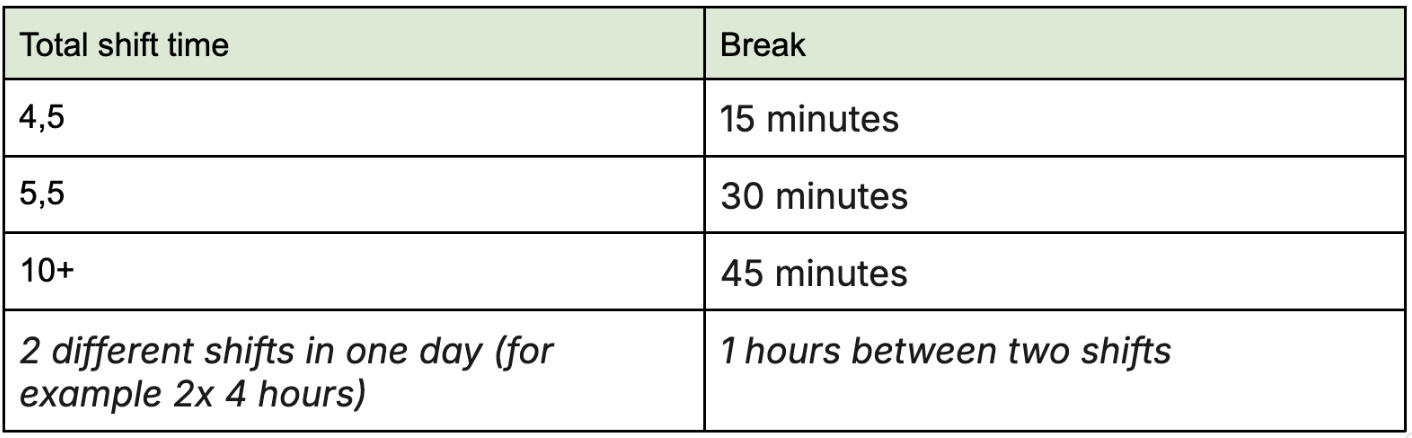
You can split your 12-hour limit into two shorter shifts. Keep in mind that you must leave at least a 2-hour gap between shifts, as the system only allows you to apply for a second shift if there’s at least a one-hour gap.
Rest time between employed shifts
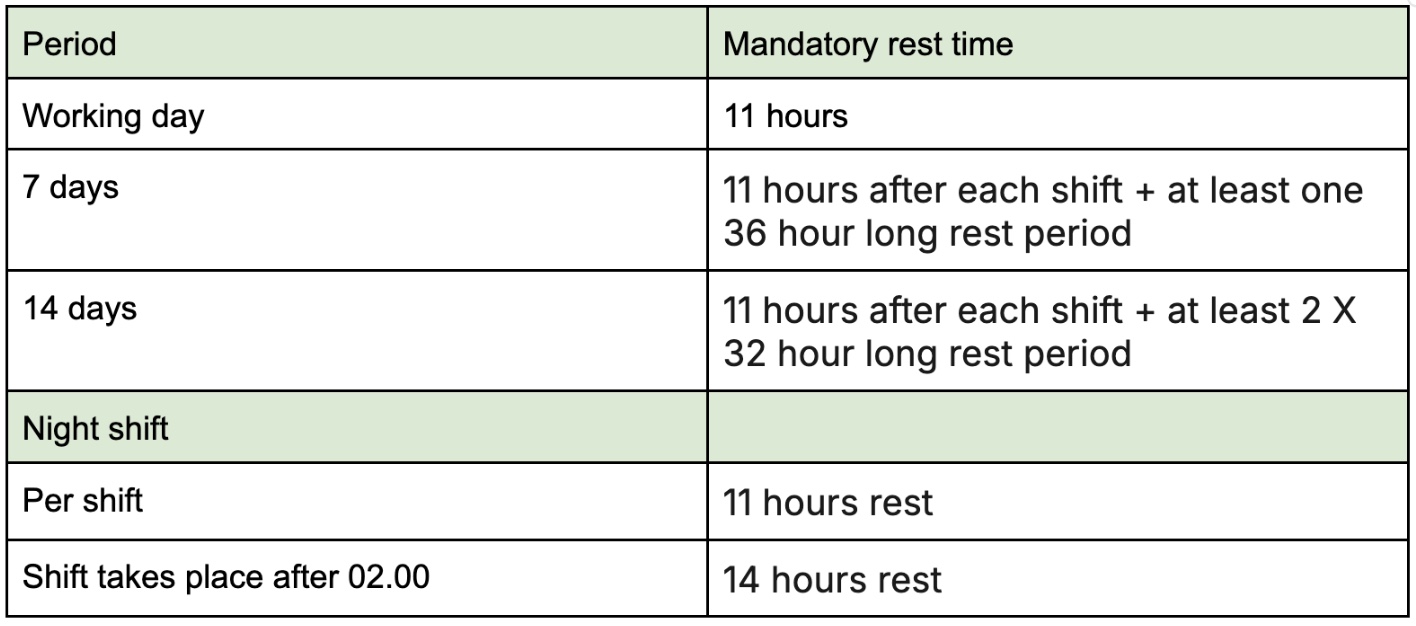
After every workday, you’re entitled to at least 11 consecutive hours of rest. And over a period of 7 or 14 days there are obligatory stretches of rest you need to take.
Limit on working hours per week
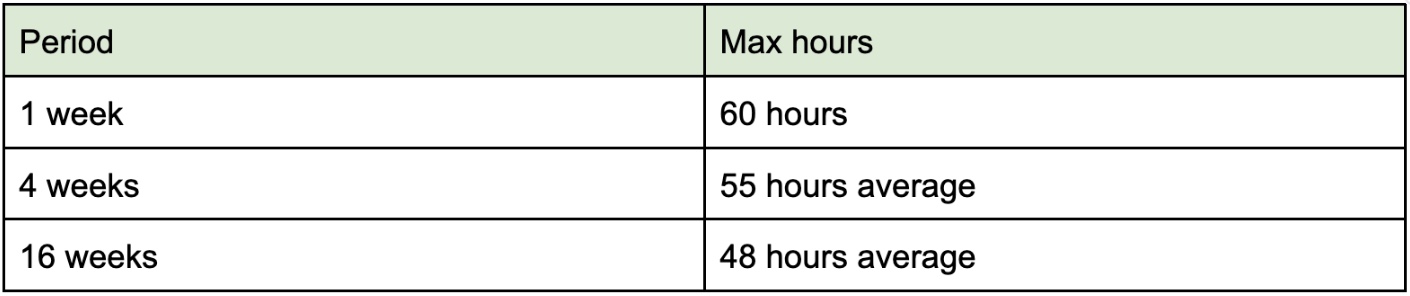
Even though you can work up to 12 hours in a shift, you can’t do that every day. There are rules for how many hours you can work in a week.
These limits are in place to make sure you still get enough time to rest and recover, even if you're working more temporarily.
Special rules for night shifts
If you prefer working night shifts, there are a few extra rules to be aware of for employed shifts. A shift counts as a night shift if any part of it falls between midnight and 6 AM. Night shifts can last a maximum of 10 hours.
If your shift ends after 2 AM, you must take at least 14 hours of rest afterward instead of 11. Also, you’re only allowed to work a maximum of 117 night shifts per year.
Why can I not apply for a certain shift?
There are a few reasons you might not be able to apply for a shift.
It also depends on whether it’s a freelance shift or an employed shift, since each type has its own logic.
Tips to get chosen for shifts faster
When you sign up for shifts through Temper, the company where the shift takes place picks the person they think is the best fit. You’re usually not the only one applying, so it’s possible you won’t always get chosen. The good news? There’s plenty you can do to boost your chances.
Create an attractive profile
Your profile is the first impression companies get of you. It’s how you stand out from the crowd. Make sure your profile looks professional. Think about a great profile picture, a clear and engaging bio, and make sure you include all your relevant work experience. Find some more tips on creating the best profile possible in this article.
Apply for multiple shifts at once
The more shifts you apply for in a day, the higher your chances of being accepted. If you’re chosen for one shift, any overlapping applications will automatically be canceled.
Keep in mind: you can still get chosen for other shifts on that same day. As long as there are at least 59 minutes between two shifts. So always keep an eye on your open applications to avoid being accepted for two shifts on the same day.
Apply for relevant shifts
Only apply for shifts that match your skills and experience. Companies are looking for someone with the right skill set. The better your profile fits, the higher your chance of being chosen.
Would you like to work as a server, but lack the experience? Start with shifts in the same branch, like a dishwashing shifts. This helps you gain experience and build a stronger profile. The more experience you have in a certain field, the better your chances!
Aim for great ratings
A good personal rating really improves your chances of getting accepted for shifts. Here are a few ways to do that:
- Prepare well: read the shift description in advance so you know exactly what’s expected and you know you can do it.
- Always be on time: first impressions count!
- ‘Own it’: take responsibility for doing a great job. Be proactive and show initiative.
Go for less popular shifts
New to Temper or don’t have many ratings yet? Apply for less popular shifts, like early mornings. This boosts your chances of being accepted, helps you build up ratings, and lets you make new connections with companies. Once you’ve made a great impression, you’ll be chosen more often for the popular shifts too!
Can I work a shift that has not been placed on the platform?
A company might ask you to pick up an extra shift, for example if you’re already on site and they ask whether you’re also available to work the next day. That’s great, of course!
Just make sure the company posts the shift on the platform so you can sign up before it starts. If you’re not accepted for the shift through the platform, there’s no official agreement, you’re not insured and we won’t be able to help if something happens during your shift.
Do I need a VAT ID or KvK number?
You can find two types of shifts on our platform: employed and freelance. A VAT ID or KvK number (Chamber of Commerce) is only needed for freelance shifts, since you work these as a freelancer. For employed shifts you do not need a KvK number or VAT ID.
How many hours can I work?
You have plenty of flexibility in choosing your shifts, but there are certain limits to keep in mind. These rules are different for freelance and employed shifts.
What if I can’t find a substitute for my freelance shift?
If something comes up and you can’t make your freelance shift and the cancellation deadline has already passed, it’s up to you to find a substitute.
The client is counting on someone who meets all the requirements, so try to pick someone who’s a great fit for the shift.
I really can’t find anyone
Don’t wait, call or message the client right away. Clear and quick communication really makes a difference. It helps them decide how to handle the situation and can prevent a no-show. Sometimes they might even have a solution you hadn’t thought of.
If you come to a different agreement, you can confirm the agreement during checkout.
The client has no solution
If the client has no solution and you can’t find a substitute, you can always decide to work the shift anyway. If not, they can report you as a no-show.
If you cancel on time (before the cancellation deadline), you don’t need to find a substitute.
I want more information about a shift
Companies post their own shifts, so we don’t have any more information than you do. Got a question? Feel free to call the company directly! You’ll only get their contact details through the platform once you’re accepted for a shift, so if you want to reach out before that, just search for their number or email address online.
When will my application for a shift be accepted?
When you apply for a shift, the company needs to accept your application, so it’s hard to say exactly when that will happen. We ask them to respond to applications at least 24 hours in advance, but it’s possible that they respond later, sometimes even right before the shift starts.
Withdraw your application on time
It’s your responsibility to keep an eye on your open applications. Check them regularly and withdraw any applications when you no longer want to wait for a response. This way, you won’t be accepted last-minute when you’re not actually available.
Automatic withdrawal
When signing up, you can choose to automatically withdraw your registration if you haven't received a response by a specified number of hours before the shift starts.
What happens if you miss a shift
If you don’t notice in time that you were accepted and miss the shift, the company can mark you as a no-show. This lowers the attendance percentage visible to companies on your profile. For employed shifts, you could also get multiple strikes.
How do I know if DirectPay will be available for a freelance shift?
Before signing up for a freelance shift, you can always see if DirectPay will be available. If it’s not, this will be clearly shown in the shift details, in the same section where the date and times are listed. As shown below:
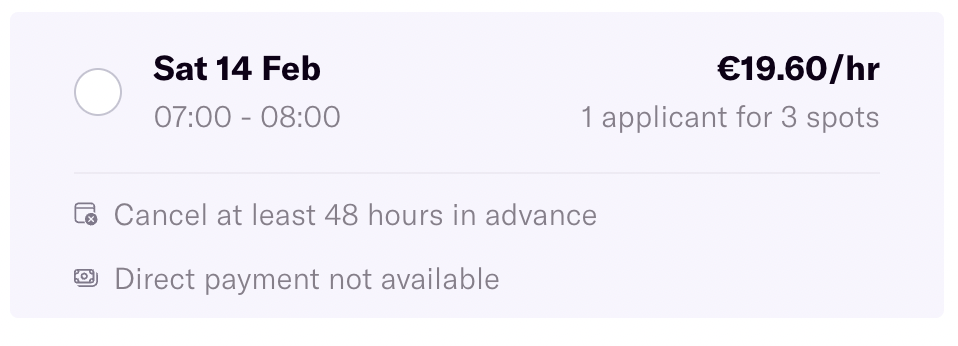
Simple as that! If you do not choose this option, you will receive your money after the client has made the payment.
Can I negotiate the hourly rate for a shift?
You can only negotiate the hourly offered rate for freelance shifts.
Why can I work only 660 hours a year for a client?
Through our platform, you can work a maximum of 660 hours per year at the same client as a freelancer. Once you’ve reached the 660 hours, you’ll receive a notification through the platform that you won’t be able to work for the same client again this year.
Why is there a maximum?
An important part of entrepreneurship is working for multiple clients. That’s why there’s a guideline of a maximum of 660 hours per client. This encourages you to spread your work across different clients.
What if the client asks me to do other work than described in the briefing?
The shift description explains exactly what is expected of you and what you can expect. For example, what tasks you will perform. These expectations are also included in the agreement you sign when you get hired for the shift. So, if you’re hired for a barista shift, you cannot be placed in the dishwashing area without agreeing to this.
The company can always check with you if you’re open to doing other tasks. It’s great if you’re flexible, but in the end it’s your choice.
If there’s no work in your planned role and you don’t want to switch tasks, you can ask the client to cancel the shift.
What is important when applying for a shift?
To find a shift that really matches you, it’s important to read the shift description carefully. This is where the company explains what they’re looking for and what you can expect. Here are some things to pay attention to:
Freelance vs employed
On the platform, you’ll find both employed and freelance shifts. You choose what you want to do and can easily set this in the search filters. Or you can go for both, totally up to you!
Hourly compensation
You decide what your skills are worth. Pick a shift with an hourly compensation that you’re happy with.
Company & tasks
Read the company’s description carefully. This gives you a good idea of the shift and helps you decide whether it’s a good fit for you.
Skills
You know best what you can do. Only apply for shifts where your skills match the requirements. After the shift, the company will rate your performance. And if you arrive without the necessary skills, they can refuse you and mark you as a no-show.
Appearance
Companies often have specific requirements for your appearance. For example, if you need to dress in a specific colour. You are, after all, the face of their business during the shift. Make sure you meet all requirements so you can start working without issues.
Shift duration
Pay close attention to the shift times. Being late can affect your on-time percentage. If you’re unsure if you can make it, it’s safer to pick a different shift. Better safe than sorry!
Location
Some locations are hard to reach by public transport late at night. Make sure you allow enough travel time and have a plan B in case something goes wrong. If you’re not at the location on time, the company can mark you as a no-show.
Cancellation policy
Check the cancellation policy before applying for a shift. It’s listed in the application page for each specific shift. The cancellation period can be between 24 hours and 7 days. If you can’t make it to your shift last-minute, this can have consequences.
Am I entitled to breaks during my shift?
Taking a break while you work is always important. It gives you time to eat, relax, and get back to work with fresh energy. Here are the rules for freelance and employed shifts.
I’m late for a shift. What should I do?
If you’re running late for a shift, make sure to let the company know as soon as you can.
Keep in mind that if you arrive late, the company might decide not to let you start working and could mark you as a no-show. Reaching out to them as soon as possible can avoid this.
On-time percentage
During check-out, the company indicates whether you arrived on time. If you're late, it will affect your on-time percentage. Other companies can see this score when you apply for future shifts, so arriving on time helps you stand out.
Where can I find the company’s contact details?
Once you’ve been accepted for a shift, you can easily find the company’s contact details. Just head to your dashboard, open the shift, and you’ll find the information on the shift page.
The details are not listed or are incorrect
If the details are incorrect, take a quick look at the shift briefing, as companies often share extra details there. If you’re working an employed shift, it’s also a good idea to download the Arbo document. Sometimes contact details are included in this document.
I haven’t been accepted for the shift yet, but I do have a question.
Since contact details only become available after you’ve been accepted, it’s important not to apply for shifts if you still have questions or doubts. In this case it’s best to look look up the company online and find a phone number or email address to contact the company. You can also always stop by the location to ask your question or get the right contact details in person.
I really can’t find the correct contact details
If you’re still unable to find the correct details, contact our support team.
