



Hi, we’re here to help
Find the answers to all your questions.
Payments
How to understand your payslip
You receive a payslip each week for the shifts worked during the relevant period. The contract date determines which payslip a shift appears on, not the payment date. If a shift is approved after the Wednesday deadline, the original payslip is updated.
Each payslip consists of four sections:
- Basic information: general information about you and your contract.
- Gross amounts per assignment: your earnings and hours worked per shift.
- From gross to net: how your gross pay is converted into your net pay.
- Accruals overview: an overview of accrued amounts, such as holiday pay and leave allowances.
Below, we explain what the different items on your payslip mean.
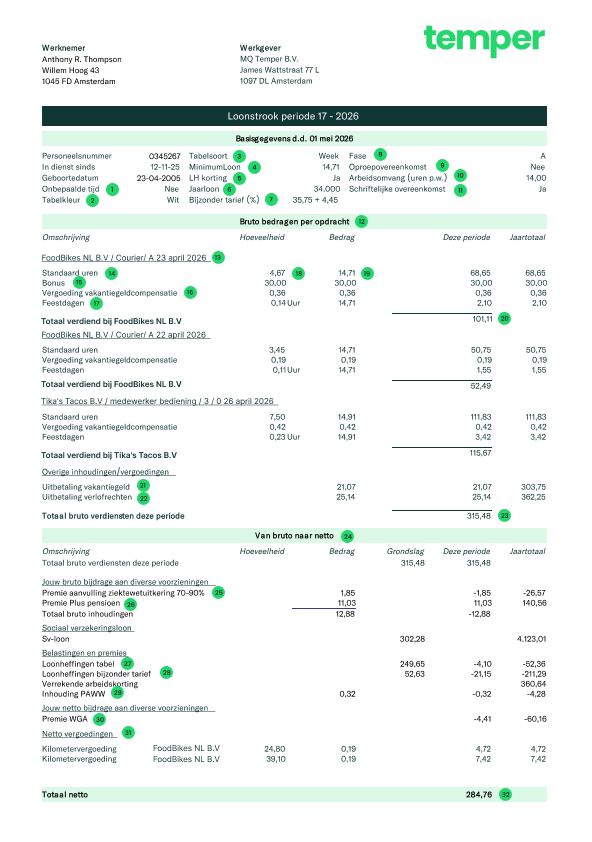
1 Onbepaalde tijd
This indicates whether you have a permanent employment contract. For Phase A contracts, this will always be No.
2 Tabelkleur
A white table represents income from your current employment.
3 Tabelsoort
This is the time period used for your payslip.
4 Minimumloon
This is the legal minimum wage. See the current minimum wage here.
5 LH korting
This indicates whether you have activated payroll tax credit.
6 Jaarloon
The estimated fiscal annual salary, calculated based on this payslip.
7 Bijzonder tarief (%)
The special rate is a higher tax percentage that you pay on holiday work, overtime or bonuses.
8 Fase
This is the staffing phase of your contract. For new flex workers, this is Phase A.
9 Oproepovereenkomst
This refers to a contract where you only work when called upon, which does not apply to Temper.
10 Arbeidsomvang (uren p.w.)
The number of hours specified in your contract.
11 Schriftelijke overeenkomst
‘Yes’ indicates that a written employment contract has been established.
12 Bruto bedragen per opdracht
The gross amounts earned for each assignment.
13 Shift information
The company and date the shift took place.
14 Standaard uren
The number of hours worked and the base wage for this period.
15 Bonus
This indicates whether you received a bonus during your shift.
16 Vergoeding vakantiegeld compensatie
This line can be used to indicate a temporary correction related to a change in holiday pay rules.
17 Feestdagen
This is your accrued compensation for public holidays, based on hours worked this period.
18 Gewerkte uren
The total number of hours you worked.
19 Bedrag
This is the base hourly rate, excluding additional benefits. The amount shown on the shift page includes holiday pay, holiday allowance and other additional benefits.
20 Totaal verdiend bij
Your gross earnings for this shift, excluding holiday pay and accrued leave entitlements.
21 Uitbetaling vakantiegeld
The holiday pay you accrued during this period. It is paid out immediately.
22 Uitbetaling verlofrechten
The leave entitlements you accrued during this period. These are paid out immediately.
23 Totaal bruto verdiensten deze periode
Your total gross earnings for this period.
24 Van bruto naar netto
From gross to net. The calculation below shows how your net pay is calculated.
25 Premie aanvulling ziektewetuitkering 70–90%
A deduction from your salary to receive a higher percentage of your income, such as 90% instead of 70%, during illness.
26 Premie Plus pensioen
You pay a small part of your salary towards your pension. Temper adds extra pension contributions to your StiPP pension.
27 Loonheffingen tabel
This shows how much tax has been withheld from your salary. If you apply the payroll tax credit, less tax will be withheld from your salary, so this amount will be lower.
28 Loonheffing bijzonder tarief
The special tax rate is a higher tax rate that you pay on holiday work, overtime or bonuses. Payroll tax credits do not apply to this.
29 Inhouding PAWW
A deduction from your salary to cover the PAWW premium, which provides additional income if your WW or WGA benefit ends before you can return to work.
30 Premie WGA
A contribution towards insurance that provides income support if you become partially unable to work after a long-term illness.
31 Netto vergoedingen
Reimbursements you receive net, such as travel expenses.
32 Totaal netto
Your net income for this period.
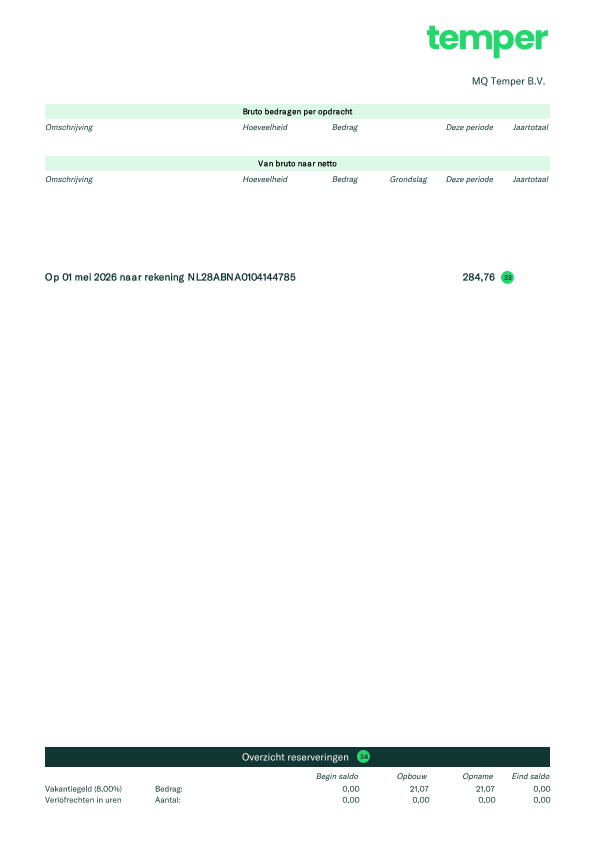
33 Naar rekening
The amount transferred to you. If you received more than the net amount, it’s possible that a payment from another period was included.
34 Overzicht reserveringen
An overview of the amounts you have accrued, such as holiday pay and leave entitlements. These amounts are paid out directly with your salary.
How does invoicing work with substitution shifts?
If you arrange for a substitute to cover one of your shifts, they work on your behalf. This means the agreement with the client remains in your name, while you hire the substitute to complete the shift.
From an administrative perspective, you invoice the client, and the substitute invoices you. To keep things simple, this process is handled automatically.
Invoicing
In your financial overview, you'll see two invoices whenever one of your shifts has been substituted: your invoice to the client and the substitute's invoice to you.
The substitute will only see one invoice in their financial overview: their invoice to you.
Business details on the invoice
Please note that the substitute's invoice will include your VAT ID and, if applicable, your KvK number and company address. This is required to comply with the requirements of the Belastingdienst (Tax Administration).
Payment
Once the client has paid the collective invoice, the payment is automatically transferred to your substitute. At the same time, both invoices in your financial overview will be marked as Paid.
You'll also receive a transaction statement showing both invoices. Because the invoices are for the same amount, they offset each other, resulting in a net payment of €0 to you.
Administration and VAT return
Make sure to keep both invoices, as they form part of your administration and must be included in your VAT return.
Read more about substitute costs here.
Why is 'DirectPay' not available?
Sometimes DirectPay might not be available for a particular shift. This depends on the client’s credit.
Client’s credit
Clients can post as many shifts as they want, but DirectPay is only possible if they have enough credit. Finqle provides clients with a certain amount of credit. This is the amount that they’re willing to advance to flex workers for Freelance shifts. Keep in mind that when you choose for DirectPay, Finqle pays you immediately (for a fee of 2.9% of the invoice amount), but in turn waits for the client to pay and takes on the credit risk.
Why is DirectPay not available?
Every time a flex worker chooses DirectPay, the invoice amount is deducted from the client’s available credit. If the credit runs out, DirectPay will temporarily no longer be available.
How do I know if DirectPay is possible?
DirectPay is available for all shifts unless it says otherwise. So always check when signing up whether it says “DirectPay not available.”
What if the client’s credit status changes after I signed up for a shift?
In that case, Finqle will send you an email letting you know that DirectPay is no longer possible.
You can still cancel the shift up to 12 hours before it starts. If you don’t cancel in time, you won’t be able to choose DirectPay at checkout and you will have to wait for the clients payment and take on the debtor risk yourself.
Note: If the shift starts within 12 hours or has already passed, you won’t receive an email and the old conditions apply.
When will I get paid if I choose ‘waiting for client payment’?
When you use the services of Finqle for your freelance shift, both your invoicing and your payment are handled by them. The client pays the invoice to Finqle, and Finqle then pays you. If you choose the “wait for client payment” option at the checkout, you’ll be paid automatically once the client has paid the invoice.
Payment term
Clients have up to 14, 30, 45 of 60 days to pay the invoice after they’ve received it. You can always find the relevant payment term for your shift in your shift's assignment agreement.
Do keep in mind that the invoice date is defined by the date the client received the invoice, and not by the date you have worked. Clients receive a collective invoice from Finqle every Monday and Thursday. These collective invoices include the invoices of all flex workers whose checkouts have been approved before.
What if my invoice has expired?
If payment has not been received by the due date, Finqle will send payment reminders to your client. It’s common to give the client a little extra time to pay after the payment term has passed.
Keep in mind that business payments can sometimes take longer than expected. Delayed payments are a normal part of the credit risk that comes with working as a freelancer or self-employed professional.
How do I make sure, I get paid in time in the future?
We recommend you to choose DirectPay. With this payment option you will get paid within minutes after your checkout has been confirmed by the client. This option costs 2.9% of your invoice.
When will I receive the payment of my claim?
Has the client cancelled your freelance shift after the cancellation deadline? In that case you will have the option to claim 50% of the total shift.
Processing a claim
After you file the claim, it takes about 7 days to be processed. Once that’s done, the invoice will be created and sent to the client on the next Monday or Thursday.
Invoice and payment term
You’ll find the sales invoice in your financial overview from the moment it’s send to the client. The date on the invoice marks the start of the payment term. You can find the payment term and duedate on your invoice. As soon as the client pays, you’ll receive your payment within 24 hours.
Note: DirectPay isn’t available for claims.
What is a sales invoice?
In the financial overview, you can download all invoices and important documents generated via Finqle for your freelance shifts, including the sales invoice. This is your invoice to the client. The reference number of a sales invoice always starts with the letter M.
Collective invoice
In your sales invoice you can find a collective invoice number (starting with the letter C). This is the number of the invoice that is sent to the client. Finqle bundles individual invoices from different flex workers into one collective invoice, making it easier for clients to pay everyone.
If you have a question about your payment from the client, use this number, as it’s the one they recognise.
Invoice date
The invoice date (not the date of your shift) is important for your administration and tax filing, it determines which tax period your declaration falls into.
You might be able to download your invoice a few days before the invoice date, especially if you use DirectPay. This is because clients only receive a collective invoice on Monday and Thursday. For proper administration, it’s important that both invoices have the same date.
Have you chosen DirectPay?
It’s good to know that the total amount on your sales invoice (M), including VAT, is not the amount you will actually receive if you’ve chosen for DirectPay. The factoring costs still need to be deducted. For this, you will receive a separate invoice: the purchase invoice (reference number starting with F). The calculation is reflected in your transaction statement (T), which shows the exact amount you’ve been paid.
You can all documents in your financial overview.
My payment is late. What happens next?
Most invoices are paid on time, but sometimes payments may take a bit longer. For example because of administrative delays on the client’s side. No worries, this is not unusual for business payments. Here’s what you need to know if that happens.
Follow up
Once the payment due date has passed, Finqle automatically starts following up with the client. They’ll first send friendly reminders and, if needed, reach out by phone.
If that still doesn’t work, stricter measures may follow, like a final notice, involving an external collection agency and temporarily limiting access to the platform.
These actions are assessed on a case-by-case basis by Finqle. Cooperation and understanding of the client’s specific situation are the main priorities in the internal collection process.
Luckily, most invoices are paid within a few weeks.
Collective invoices
Your invoice isn’t sent separately; it’s included in a collective invoice that includes invoices from other flex workers and also Temper. This gives Finqle a stronger position to collect the payment.
What do you need to do?
Nothing. You don’t have to take any action. You’ll automatically get email updates if there’s any news to share. Of course, the best update is receiving the payment in your account.
When should you contact support?
Usually, you don’t need to. Finqle is already on top of it, and Support can’t speed up the process.
Only reach out if your invoice is more than a month overdue or if you have questions about the invoice itself. We’re more than happy to help where we can in those cases.
How to avoid late payments in the future?
As a freelancer, you run the risk of clients paying late, this is called debtor risk. If you’d rather not take that risk, choose DirectPay. Finqle will pay you directly for a small fee and then wait for the payment from the client themselves.
When will I receive my payment if I have chosen DirectPay?
If you choose DirectPay for your freelance shift, the payment of your invoices is handled by the independent factoring company Finqle. After approval of your checkout the payment is transferred to you in just minutes.
Fast and save
It’s the fastest and easiest way to get paid, as you’re not dependent on the client’s payment terms. Finqle pays the amount up front and takes over the debtor risk. The cost for this service is 2.9% of the total invoice amount. Keep in mind that, depending on your bank, it may still take an additional business day to appear in your account.
You choose how you work
Before signing up for a shift, you can always see if DirectPay will be available. If it’s not, this will be clearly shown in the shift details, in the same section where the date and times are listed.
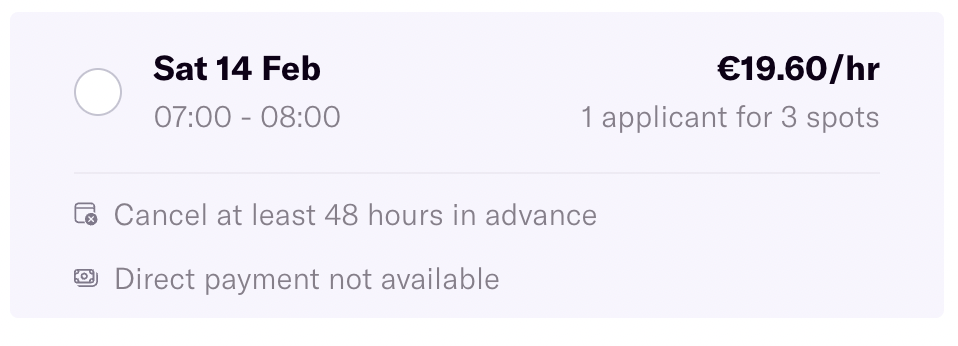
Simple as that! If you do not choose this option, you will receive your money after the client has made the payment.
What is a purchase invoice?
If you chose DirectPay for your freelance shift, you won’t only receive a sales invoice (M). bit you’ll also get a purchase invoice(F) from Finqle for the factoring fees.
These are the costs for DirectPay, an optional service where Finqle takes over your sales invoice and pays you right away, while they wait for the client to pay. The fee is 2.9% of the total amount per shift.
How to understand your purchase invoice
- Page 1: Your company info, Finqle’s details, and the total factoring fees.
- Page 2: A breakdown of the sales invoices (M) Finqle has taken over and the associated fees.
Payment
You don’t have to pay the purchase invoice yourself; the fees are automatically deducted from your sales invoice. You can check the details in your transaction statement (T).
Administration
It’s important to keep the invoices for your records. They count as business expenses and are deductible on your income tax and, if relevant, your quarterly VAT return.
The client went bankrupt. Will I still get my money?
If you have an unpaid invoice and your client goes bankrupt, there’s a chance you may not receive payment. Learn more about how the bankruptcy process works.
Bankruptcy
A (creditor of the) client can file for bankruptcy at the court. Once the court has given its verdict on the initial bankruptcy, they will appoint a curator.
A curator will investigate whether the client has capital left, to be shared among the due creditors. Often in situations as such, there isn’t enough capital to pay everyone back what they are owed respectively and so the curator equally divides the properties according to the law and its legislation.
But there is an order. The curator, will be the first party to get their salary paid, after which the Tax Administration (Belastingdienst) and the UWV (Employee Insurance Agency) are in line to get their share.
Unfortunately, you as a flex worker, are the last in line in this process. As soon as Finqle is aware of the bankruptcy, you will be notified.
How can you still get paid?
All creditors are required to report to the appointed curator. As a flex worker using the services of Finqle, you don’t need to take any action yourself (unless communicated otherwise). But if you’ve chosen to invoice the client directly yourself, then you will need to take these actions independently.
It can sometimes take up to 6 months before the curator has divided all the remaining properties of the client. Please be aware that the chance exists that you may not receive the money that you are owed. If the client does pay the open invoices or part of, you will receive this as a payment from Finqle. Once and if Finqle receives an update on the status of the open invoices, they will notify all flex workers affected by the bankruptcy.
This means you don’t have to take any action and that the only thing you can really do is to be patient.
When will my invoice be sent to the client?
When you use Finqle’s invoicing services for your freelance shifts, our system automatically generates a sales invoice in your name as soon as you and the client have finalized the checkout. This invoice is based on the checkout details and the agreements you made with the client in the assignment agreement.
Collective invoice
Your sales invoice is included in a collective invoice that Finqle sends to the client every Monday and Thursday, together with invoices from other freelancers. You can find the collective invoice number on your sales invoice.
The collective invoice is also available in the client's financial overview, where they can view and pay all outstanding invoices.
I received a different amount than expected for my employed shift.
Did you expect a different amount than what you received for your employed shift? There are three common reasons. Download your payslip to see exactly what caused the difference.
The amount on my payslip matches what I received, but I expected something else
- How your pay goes from gross to net
The shift page shows an calculation of your hourly wage, but the final payment can be slightly different. The amount listed is gross and doesn’t take into account individual tax deductions or extra allowances, like travel reimbursement. Your final payment reflects these adjustments.
Did you know you may be eligible for payroll tax credit? It reduces the amount of tax withheld from your wages, so you take home more net pay.
Read more about how your salary is calculated here.
I received more/less than what’s on my payslip
- You were paid for a shift from a different week
If your payslip doesn’t match the amount that you’ve received in your account, it might be because a shift from another week was paid out. If a checkout wasn’t accepted on time, the shift is paid a week later, but will still appear on the payslip of the week in which it took place.
So if you received more than what’s on your current payslip, download your older payslips to see the difference. You’ll see a correction page showing the updated payment date.
- A pay correction was made
If a correction was needed for a previous payslip, like if hours were recorded too high or too low, it might be adjusted in this week’s payment.
Check your older payslips to see if a correction was made. You’ll recognize it by an extra page added to the payslip, showing the adjustment, the amount, and the date it was paid or deducted. This date matches the day you received a different amount than expected.
According to the platform, I have been paid but I haven’t received anything.
If the platform shows you’ve been paid but the money hasn’t hit your account yet, it might just take an extra day for the bank to process it. Keep in mind that banks don’t process payments over the weekend.
We usually recommend waiting at least two days.
Check your details
Please check your profile to make sure your IBAN is correct.
Freelance shifts
Freelance payments are processed through Finqle. Have you recently updated your IBAN with us? If so, you should have received an email from Finqle. You need to confirm your new details through that email before payments will go to your new account.
Download the transaction statement from your financial overview and check which bank account the payment was sent to.
Is your IBAN incorrect, or have you not received your payment within 2 days? Please contact support.
What is the deed of assignment?
If you do freelance shifts through Temper and use Finqle’s invoicing system, you’ll receive a deed of assignment for each shift. This transfers your right to payment to Finqle B.V.
What does this mean for you?
- Finqle receives the payment from your client on your behalf.
- You don’t have to collect the payment yourself.
- It simplifies the payment process and aligns with your Temper user agreement.
You don’t need to do anything; the document is automatically created and processed. You can find it in your financial overview.
Why is there no VAT on my invoice?
There’s three possible reasons why no VAT has been added to the invoice for your freelance shift.
Trying out a freelance shift
You can try working a freelance shift once before registering as a freelancer and getting your VAT ID. If you don’t have a VAT ID yet, your first invoice will not include VAT. This means you don’t have to include this income in your next VAT declaration. You still need to report your earnings in your annual income tax declaration.
Please keep in mind: Did you already have a VAT ID when you applied for the shift, but hadn’t added it to your profile yet? Don’t worry, this only means that your first invoice won’t include VAT. You won’t have to pay VAT on this invoice during your next VAT declaration.
The Small Enterprises Scheme (KOR)
Flex workers who are registered for the Small Business Scheme (KOR) are exempt from charging VAT. This means that if you’ve activated the KOR with the Belastingdienst (Tax Administration) and on our platform, you don’t charge VAT to your clients and don’t need to file VAT returns. Read everything about the KOR here.
The VAT reverse charge scheme
It may be that your client is carrying out a task for another company and wants to use you for it. The client then acts as the main contractor for the other party, and you as a flex workers are a subcontractor. In this case, VAT is not invoiced on your invoice but on that of your client. The VAT is thus reversed. Read more about the VAT reverse charge scheme from the Belastingdienst.
What type of documents can I expect after a freelance shift?
Once your checkout is approved for your freelance shift, you will receive a number of important documents. Go to your financial overview and to 'invoices'. By clicking on download, you can download one or more documents. You can recognize them by a reference number starting with M, F, T, or D.
- Sales invoice (M): This is your invoice to the client.
- Purchase invoice (F): If you've chosen DirectPay as your payment method, you'll also receive an invoice for the factoring fee, known as a purchase invoice (F).
- Deed of assignment (D): When you make use of Finqle's invoicing services, you are - as per user agreement - handing over your invoice to factoring company Finqle. You will receive a legal document outlining the rights and obligations of this arrangement, known as a deed of assignment.
Once the payment is processed, you will receive a transaction statement (T). You can download this under ‘payments’ in your financial overview.
- Transaction statement (T): The amount you have received on your account matches the total on this document.
Adiministration
The sales invoice and the purchase invoice are documents you must keep for your own records and which you need for tax declaration.
Do I have to send invoices myself?
The platform can help you with invoicing. Super easy! Once you and the client have agreed on the checkout, a sales invoice is automatically created on your behalf based on that information and the assignment agreements. This invoice is sent to the client on Monday or Thursday. You can find all your invoices in your “financial overview” in your profile.
You can also choose to handle invoicing (and payment) outside of Finqle. Keep in mind: you’ll need to coordinate this with the client in advance so they know what to expect.
I was not paid for my employed shift
If you think you are missing an employed shift payment, don’t worry! Here are a few reasons why it might not have come through yet:
Timing of the shift:
You will always be paid for a shift in the following week the earliest. For example, if you worked on a Monday, you will be paid on the Friday of the following week, not the first Friday after your shift. This also depends on when you and the client have finalized the checkout.
Checkout not completed
The hiring company you worked at hasn’t finished the checkout process yet. They have 7 days to wrap it up before your checkout gets automatically accepted. So, you might need to wait a bit longer.
Checkout timing and cut-off time
Companies have 7 days to complete the checkout. If this checkout is performed before Wednesday 10:00 in the morning, and your shift was last week, you will receive payment that very Friday. If it’s after that cutoff time, you will have to wait until Friday next week. Read more about when you get paid in this article.
IBAN issues
You might not have shared your IBAN, or you could have provided the wrong one. Double-check to make sure everything’s correct. You can contact support if you need to have your IBAN changed.
Something went wrong
If everything seems fine and you’re still waiting, it’s possible something went wrong on our end. Reach out to support, and they’ll help you sort it out.
We hope this helps clear things up!
What is a transaction statement?
Once Finqle has processed the payment for a freelance shift, you can download the transaction statement from your financial overview. This shows exactly which shifts were paid together and any fees applied if you used DirectPay. Each overview has a unique number starting with the letter T.
Two pages
- Page 1: Shows your total earnings, any factoring fees, and the total amount paid and on which date. This matches the amount that appears in your bank account.
- Page 2: Provides a detailed list of what you earned per shift, linked to the corresponding sales invoice (reference number M) and any DirectPay fees, linked to the purchase invoice (reference number F).
How do I know what shifts I've been paid for?
Have you received a payment and want to check which shifts you were paid for? You can easily find this in your financial overview.
Profile → Financial overview → Payments
Simply match the amount you received in your bank account with the payment amount shown. Freelance and employed shifts are paid separately; read more about each below.
What is Finqle?
As a freelancers you can choose to handle your invoicing and accounts receivable through Finqle. Finqle is an independent factoring company with lots of experience.
They also offer the option for factoring. With factoring, for 2,9% of the total invoice, you can get paid right after your checkout is approved. A smart way to access your money faster.
Any questions? Finqle is easy to reach at 085 3033 650 or info@finqle.nl.
Where can I see / download my invoices and payslips?
For employed shifts, you’ll receive weekly payslips, and for freelance shifts, you’ll receive invoices. You can always view and download them in the financial overview in your profile.
Why is there no final settlement?
A final settlement usually includes any outstanding salary and payment for built-up but unused vacation days. It’s the last financial step when someone leaves a job.
For employed shifts at Temper, that’s not necessary. Each shift has its own separate employment contract and after your shift ends, the contract automatically ends because of the agency clause. Your built-up vacation days are paid out immediately.
A final payroll settlement does not apply to freelancers.
DirectPay was not on time, can I get the factoring costs back?
It rarely happens, but unforeseen issues can pop up, causing you not to receive the payment for your freelance shift directly after the client’s approval of the checkout.
If this is the case, please contact us, we’re happy to help solve this as quickly as possible.
Debtor risk
Do keep in mind that even if your payment arrives later than expected, Finqle still carries the debtor risk. They are waiting for the client’s payment, which could be late or, in rare cases, never come. For this reason, the 2.9% fee you paid cannot be refunded. After all, you are still guaranteed to receive your payment.
Do I get a payslip for my employed shift?
For each employed shift, you’ll get a payslip on payday (Fridays) for the period you worked. It shows exactly what you got paid for and how your net salary was calculated.
Download in the app
You can easily find all your payslips in the app. The contract date (the day you worked) decides which payslip a shift appears on, they’re organized by week.
Shifts paid later
If a shift is paid later than the others in the same week, it will be added to the payslip for the week in which the contract date falls. You can download the updated version on the same Friday you’ll receive the payment.
For freelance shifts you’ll be able to download your invoices after the shift.
How do I know when the payment term of my invoice has expired?
If you choose ‘wait for the client to pay’, your client pays the invoice directly to Finqle, and Finqle pays you once the invoice has been paid.
Payment terms are typically 14 or 30 days, but can sometimes be 45 or 60 days. The average payment term shown at checkout is only an indication and not a guarantee.
Due date
- Go to your Financial overview in your Profile
- Go to Invoices
- Download your sales invoice.
- The date on the invoice is the day on which your invoice has been received by the client. You can also find the payment term and expiration date on the invoice.
What if the payment term has expired?
Once the payment-term of the invoice has expired, we call this an ‘overdue invoice.’ From this moment onwards, it’s important to grant the client a little bit of extra time. During this time, Finqle will start to send the client payment reminders and investigate why the invoice hasn’t been paid yet.
What is ‘debtor risk’?
As a freelancer, you send invoices to your client for the work you have completed. In most cases, these are paid on time. But, there is always a risk involved: the so-called debtor risk.
Overdue invoices
Debtor risk is the risk that a client pays late, or in the worst case, not pays at all. To help with this, Finqle handles the follow-up of overdue payments free of charge. Read more about the steps they take when a payment is not received on time.
Can you avoid this risk?
If you prefer to avoid this risk, you can choose to only accept shifts for which DirectPay is available. In that case, you pay 2.9% of the invoice amount to Finqle, but in return, they pay you directly after the checkout. Finqle then waits for the client’s payment and takes on the debtor risk themselves.
This way, you, as a freelancer, maintain more control over your earnings and avoid unpleasant surprises.
When do I get paid for my shift?
To get paid, you’ll need to complete the checkout after your shift. You fill in how long you’ve worked and any breaks you took. The company you worked at reviews it, and if they agree, accept your checkout. After this, the payment process can start. This works differently for freelance and employed shifts.
Do I need to contact the client about a late payment?
Once the payment term has expired, Finqle will start the collection process free of charge. We recommend waiting while Finqle handles this for you.
So you don’t have to contact the client yourself, but if the invoice has been overdue for a longer period (for example longer than 30 days), we understand you do want to do so.
If you do reach out to the client, make sure you share the collective invoice number with them. This is the number known in their system. You can find this number in your own invoice, and it starts with the C.
What is Maqqie?
Temper is your official employer during your employed shifts. We partner with Maqqie for some behind-the-scenes services, like payrolling, pension, insurance, and long-term illness cases. For you, this doesn’t change much. In almost every instance, Temper will still be your first point of contact.
