



Hi, we’re here to help
Find answers to all your questions.
All topics
UberEats: I have technical issues with the Uber app
If you’re doing employed shifts for UberEats and using the Uber Driver app, you might run into some issues sometimes. Below are the main causes and how to fix them. If the problem continues, help is available.
Can't go online?
Before your first shift, make sure you’ve done the following:
- Complete the safety check: You’ll get a pop-up with a bike. Tap all the checkmarks, take a photo, and choose "software" as the issue.
- App says "contact support": Fully close the app and reopen it. That usually helps.
- App asks to pick a vehicle: Choose "bicycle" for example and continue.
- Allow permissions: Make sure you allow location access and push notifications. The app won’t work properly without them.
- Seeing ads? Just close them. They don’t affect anything.
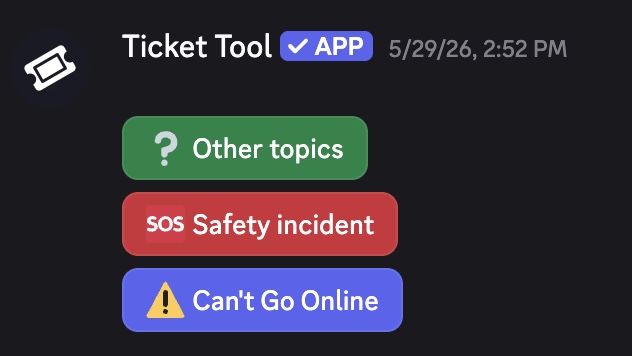
- Still not working? Tap on the error message for more info. If you’re still stuck, follow the below steps to raise your issue via Discord.
Discord:
- Join the Amsterdam Temper group in the Discord Community: https://discord.com/invite/nNprrrfv6S
- Go to the courier-support channel (on the left)
- Start a ticket by choosing what issue you need help with
Why isn’t my VAT ID accepted?
Did you already add your VAT ID to your Temper profile, but still see a message saying it hasn’t been entered or that the system isn’t recognizing it? Follow these steps to fix it.
Step 1: Check if the number is correct
When you register as a freelancer, the Belastingdienst (Tax Administration) gives you two different numbers:
- Your VAT tax number (omzetbelastingnummer) is used for your tax returns and communication with the Tax Authority.
- Your VAT ID (btw-identificatienummer) is the one you use for invoicing and to share with clients, that’s the one we need from you.
You can find both numbers in Mijn Belastingdienst Zakelijk. Your VAT ID always starts with NL, followed by 9 digits, the letter B, and then 2 more digits (for example: NL123456789B01).
Step 2: Check if your VAT ID is active
We regularly verify whether your VAT ID is active. It’s possible that the Tax Administration has temporarily deactivated it, for example, if you forgot to declare your taxes.
Log in to Mijn Belastingdienst Zakelijk to make sure your VAT ID is still active. If it’s not, contact the Tax Authority at 0800-0543.
Step 3: Check if your address matches
Make sure the invoice address in your Temper profile matches the address linked to your VAT ID. Also check that the business name in your profile matches the name under which your VAT ID is registered.
If you’ve recently moved, don’t forget to update your billing details in your Temper profile as well.
Step 4: Everything looks correct, now what?
If the number is valid and all details match, try re-entering your VAT ID in your Temper profile, that often solves the issue.
Still have issues or questions?
If your VAT ID is valid but the system still isn’t recognizing it after these checks, contact our support team via live chat. We’re happy to help!
This is how it works, from registration to payment.
On our platform, you can find both freelance and employed shifts. You can recognise them by the icon on the shift page. Much is the same, but a few things work slightly differently. Read below how freelance and employed shifts work, from registration to payment.
Can I work freelance shifts as a VoF or B.V?
To work freelance shifts, you need to apply for a VAT ID as a freelancer. This allows the tax authorities to track your activities and collect taxes on the work you do.
It is not possible to use a VoF or B.V., because through Temper you work as a self-employed entrepreneur.
Don’t want to register as a freelancer? No problem! You can always work employed shifts. In this case, you work as a temporary employee. You enjoy the same flexibility, but with the security of an employment contract.
When will I get paid if I choose ‘waiting for client payment’?
When you use the services of Finqle for your freelance shift, both your invoicing and your payment are handled by them. The client pays the invoice to Finqle, and Finqle then pays you. If you choose the “wait for client payment” option at the checkout, you’ll be paid automatically once the client has paid the invoice.
Payment term
Clients have up to 14, 30, 45 of 60 days to pay the invoice after they’ve received it. You can always find the relevant payment term for your shift in your shift's assignment agreement.
Do keep in mind that the invoice date is defined by the date the client received the invoice, and not by the date you have worked. Clients receive a collective invoice from Finqle every Monday and Thursday. These collective invoices include the invoices of all flex workers whose checkouts have been approved before.
What if my invoice has expired?
If payment has not been received by the due date, Finqle will send payment reminders to your client. It’s common to give the client a little extra time to pay after the payment term has passed.
Keep in mind that business payments can sometimes take longer than expected. Delayed payments are a normal part of the credit risk that comes with working as a freelancer or self-employed professional.
How do I make sure, I get paid in time in the future?
We recommend you to choose DirectPay. With this payment option you will get paid within minutes after your checkout has been confirmed by the client. This option costs 2.9% of your invoice.
What is the minimum and maximum length of an employed shift?
According to the Arbeidstijdenwet (working hours act, or WHA), the following rules apply:
Maximum shift length
A standard shift can last up to 12 hours. But, if you’re working a night shift, the maximum length is 10 hours.
Minimum shift length
Although unlikely, a shift of just 1 hour can be published by the company and worked by you.
If you have any questions or concerns about how long your shift is, feel free to check in with the hiring company to make sure everyone’s on the same page and everything follows the rules.
These rules do not apply to freelance shifts.
Can I use Temper for a short period of time?
You can use Temper whenever it works for you! Creating an account is without any commitment, and you decide when (and how often) you want to work. Great if you’re only available for a short period, for example during a study break.
Freelance
Do keep in mind that if you want to do freelance shifts but you don’t have a VAT number yet, you can only work one freelance shift before needing to apply for one. You request this from the Tax Authorities, and it can take a few weeks before you have your VAT ID.
How do I create an account with Temper?
Getting started with Temper is quick and easy.
- Download the Temper app. You can find it in your device’s app store (Google Play or the Apple App Store).
- Sign up with your email address. We'll use this email address for notifications and to log you in.
- Complete your profile. This is your “business card”. Companies reviewing your application will see your profile, so make a good first impression!
- Apply for a shift. Browse available shifts and find one that matches your profile.
- Upload your ID and citizen service number (BSN). We need these to verify that you're allowed to work in the Netherlands.
- Add your payment details. Enter your IBAN and, if applicable, your company information, such as your VAT ID and KvK number.
And that's it! You can find both employed and freelance shifts on the platform.
What’s the difference between a KvK number and a VAT ID?
As a freelancer or entrepreneur, there’s two important numbers: your KvK number and your VAT ID. But what’s the difference?
KvK number
This is your official registration with the Chamber of Commerce (KvK). Registering here officially starts your business. The KvK will request a VAT ID from the Belastingdienst on your behalf.
VAT ID
You use your VAT ID for all your tax matters, such as invoicing and to declare your taxes. This is the number you include on your invoices so your taxes can be processed correctly. Sometimes, you don't need to register with the KvK to work as a freelancer, for example, if you don't earn above a certain amount per year. In that case, you can apply for a VAT ID directly with the Belastingdienst.
In short: to work as a freelancer, you always need a VAT ID. If you work regularly, you may also need to register with the Kamer van Koophandel.
Can the company see the rating I gave them?
During checkout, you can give the company you worked at a rating in the form of a thumbs up or thumbs down. Your rating is not visible to them, but it helps other flex workers.
What's seen as a valid ID to work through Temper?
To apply for shifts via Temper, you must be legally allowed to work in the Netherlands. That’s why we ask you to upload your ID.
We accept the following documents:
- Dutch passport or identity card
- Passport or identity card from a country within the European Economic Area (EEA)
- Dutch residence permit with the remarks “Arbeid vrij toegestaan” (“Work freely permitted”) and “TWV niet vereist” (”Work Permit not required”) in most cases. Read what permits can and can’t accept here.
We can not accept:
- Driver’s licenses: do not confirm your right to work, but may be used for BSN verification.
- Residence stickers or letters: issued by the IND during an ongoing procedure; not valid on Temper.
- Temporary documents: such as the Asylum registration card; these expire once your application or appeal is decided.
- Residence permits from other EEA countries: only valid for work within the country where they were issued.
- Certain Dutch residence permits: we cannot accept documents that require an additional work permit or where extra conditions may apply. Read more about this here.
Extra document for BSN verification
We may ask for a second document to verify your BSN (Citizen Service Number). This can be your driver’s license, for example.
Always bring your ID to the shift
Next to uploading your ID on the platform, when you arrive at your shift, you’ll need to show your ID. The (hiring) companies that need to check your documentation may view it on-site, but they cannot make a copy unless your nationality is outside the EEA.
Note that a driver’s license is not sufficient for this. Always bring your national ID card, passport or residence permit.
If you have any questions about the ID verification process, feel free to contact us. We’re happy to help.
Something in the app is not working
Do you have a technical issue? That’s of course annoying, but it’s often easy to fix. Try the following first:
- Update the app to the latest version
- Delete and reinstall the app if updating doesn’t help
Still having problems?
Get in touch with us! Please forward us the following:
- A screenshot or screen recording
- A short explanation of what’s not working as expected
- If it concerns specific shifts: the date and company name
- Whether you’re using iOS or Android
Thanks for reporting it. It helps us solve the issue quickly!
