



Hi, we’re here to help
Find answers to all your questions.
All topics
Is my employed shift contract in line with labour regulations?
In the Netherlands, employment conditions are mainly set by labour law. These rules cover things like maximum working hours and required breaks, even if you have multiple contracts in one week. Your employed shift contract fully complies with these laws.
Working Hours Act
- Maximum weekly hours: There’s a limit to how many hours you can work per week. If you work a lot of hours for several weeks in a row, your allowed weekly average goes down.
- Breaks: You’re entitled to minimum break times, depending on how long your shift is.
- Rest time: You need at least 11 hours of rest between two working days. If you work night shifts, that rest period is longer.
To stay compliant with the Working Hours Act, we may sometimes cancel employed shifts or withdraw your application for a shift.
CAO (Collective Labor Agreement)
Alongside the general rules, CAOs (collective labour agreements) may include extra rules for your shift. We always make sure your shift follows these rules. Depending on the CAO you might, for example, be entitled to extra pay for things like overtime, night work, public holidays, or weekend work.
What happens to my contract when I cancel an employed shift?
Your labour contract only starts when your employed shift begins. If you cancel beforehand, the contract is automatically cancelled. But there may be consequences, so do keep the cancellation rules in mind:
More than 48 hours before your shift
There are no consequences.
Within 48 hours
This may count as a no-show and lower your attendance rate. While cancelling via the platform, you can explain to the company why you’re missing the shift; the company decides whether to report a no-show or not. You may also receive a strike for late cancellations.
For employed shifts, you can’t arrange a substitute, this is only possible for freelance shifts.
What if I didn’t cancel the shift through the platform?
If you don’t show up for your employed shift, the company can mark you as a no-show. In that case, your contract is automatically canceled. This means the employment agreement for that shift is void, and you have no further obligations for that shift.
Can I work while waiting for my VAT ID?
You can work one freelance shift to try out the platform. After that you really need a valid VAT ID.
Send to your home address
Once the Belastingdienst has approved your form, you’ll receive your VAT ID and ob-number by post. Add your VAT ID to your profile to start picking up unlimited freelance shifts.
There is no limit on how many employed shifts you can do.
What if I haven’t heard anything from the Belastingdienst
If it’s been more than 3 weeks since we sent your form and you still haven’t heard back, contact the Belastingdienst at 0800 - 0543 (free of charge) to check the status of your application.
How often can I work employed shifts?
In the Netherlands, there are rules about how much you can work as an employee. These rules cover things like maximum working hours, breaks, and rest periods.
If you work too many employed shifts, you might not be able to apply for a shift, or a shift you've already picked up could be withdrawn automatically.
The rules below apply to all employed shifts on the platform, not freelance shifts.
Maximum employed shift length
A shift can never be longer than 12 hours, and during your shift, you’re entitled to a break. The length of the break depends on how long you’re working and these breaks can be split up during your shift, as long as the total time is met.
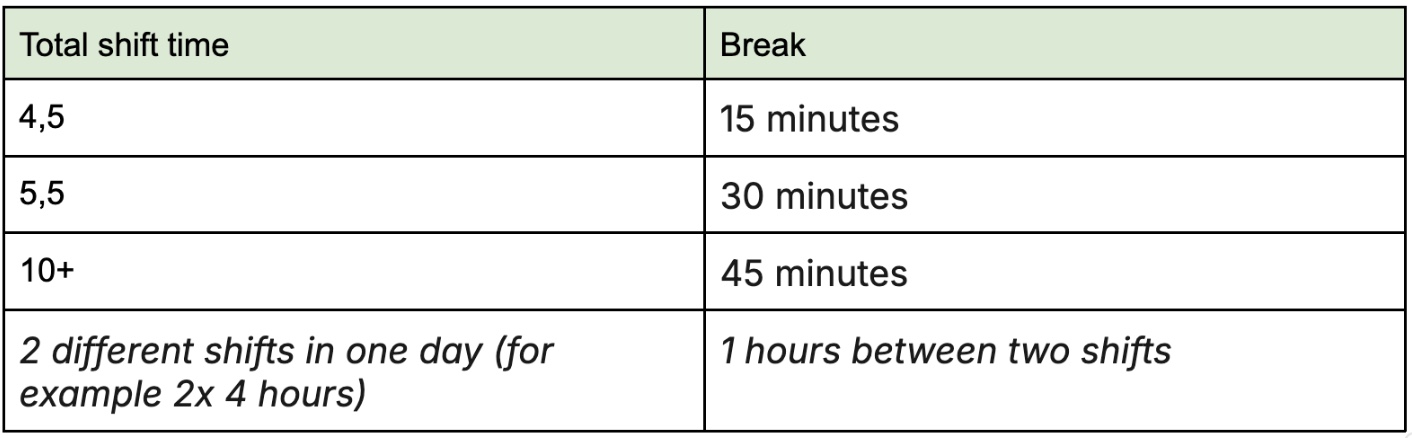
You can split your 12-hour limit into two shorter shifts. Keep in mind that you must leave at least a 2-hour gap between shifts, as the system only allows you to apply for a second shift if there’s at least a one-hour gap.
Rest time between employed shifts
After every workday, you’re entitled to at least 11 consecutive hours of rest. And over a period of 7 or 14 days there are obligatory stretches of rest you need to take.
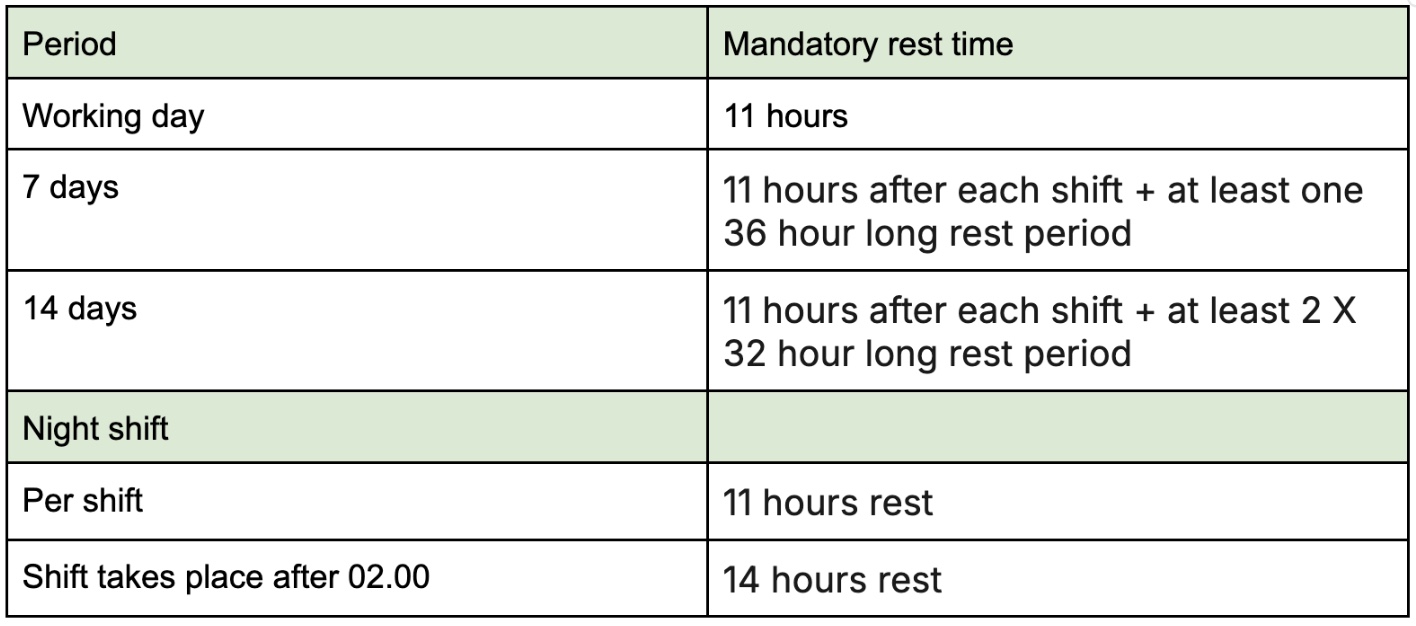
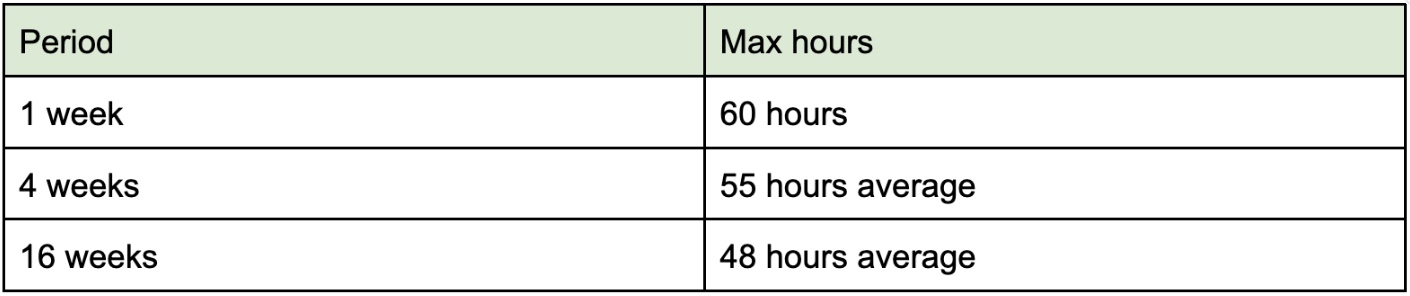
Limit on working hours per week
Even though you can work up to 12 hours in a shift, you can’t do that every day. There are rules for how many hours you can work in a week.
These limits are in place to make sure you still get enough time to rest and recover, even if you're working more temporarily.
Special rules for night shifts
If you prefer working night shifts, there are a few extra rules to be aware of for employed shifts. A shift counts as a night shift if any part of it falls between midnight and 6 AM. Night shifts can last a maximum of 10 hours.
If your shift ends after 2 AM, you must take at least 14 hours of rest afterward instead of 11. Also, you’re only allowed to work a maximum of 117 night shifts per year.
Which trade association is Temper linked with for employed shifts?
Temper is affiliated with the NBBU (Nederlandse Bond van Bemiddelings- en Uitzendondernemingen) because we not only have freelance shifts on the platform but also employed shifts. During employed shifts, you are employed by us as a flex worker.
What is NBBU?
The NBBU is a Dutch trade association for staffing agencies. They set agreements on fair working conditions and help ensure that both agency workers and hiring companies know what to expect.
Impact on you
- You are guaranteed fair treatment and adherence to labour laws.
- Your labour agreement follows NBBU guidelines, ensuring clear and fair terms.
- You have access to support and resources in case of disputes or issues at work.
For more information about NBBU, visit their website: NBBU
Can the company send me home if I don’t have the right skills?
Yes, the company can send you home if you don’t meet the requirements for a shift. That’s why it’s important to read the shift description carefully before signing up. The description tells you what skills are expected and things like the dress code.
For example, if it’s a barista shift but you don’t actually know how to operate a coffee machine, the company can decide to not let you start the shift. In that case, they’re also allowed to mark you as a no-show.
I’ve already started working
If you’ve already started your shift and realise the tasks don’t match your skills, just talk to whoever’s in charge. You can decide together what happens next. For example, you can agree to stop, and get paid for the hours you’ve already worked.
Why can I not apply for a certain shift?
There are a few reasons you might not be able to apply for a shift.
It also depends on whether it’s a freelance shift or an employed shift, since each type has its own logic.
What if I forgot to activate the payroll tax credit.
If you didn’t know you could use the payroll tax credit (loonheffingskorting) and have already worked employed shifts and received pay slips, we can’t change those pay slips retroactively. But don’t stress: if the credit wasn’t activated, you can get the extra tax you paid back.
Annual tax return
During your annual tax return, the Belastingdienst (Tax Administration) calculates your total income and determines how much income tax you should have paid. If it turns out that more tax was withheld from your wages than necessary, you will receive a refund for the difference.
What happens if I don’t declare my VAT, or do it too late?
If you file a VAT turnover tax return but don’t pay on time, the Belastingdienst (Tax Administration) can issue a late-payment fine.
Was your previous payment complete and on time? Then the Belastingdienst usually applies a 7-day grace period. If you pay within that extra week, you can often avoid a fine, although this is a courtesy, not a guaranteed right.
You can find more information on the page of the Belastingdienst.
Do I have to send invoices myself?
The platform can help you with invoicing. Super easy! Once you and the client have agreed on the checkout, a sales invoice is automatically created on your behalf based on that information and the assignment agreements. This invoice is sent to the client on Monday or Thursday. You can find all your invoices in your “financial overview” in your profile.
You can also choose to handle invoicing (and payment) outside of Finqle. Keep in mind: you’ll need to coordinate this with the client in advance so they know what to expect.
UberEats: how do I apply for shifts?
To work Uber Eats shifts and use the Planner in the Uber Eats app, you'll first need to be onboarded for Uber Eats shifts. Once that's done, you'll be able to see all available shifts in the Planner and book or cancel them directly.
Where can I find available shifts?
All available shifts can be found in the Planner in the Uber Driver app. Here you can see:
- New shifts for the following week
- Available shifts for the current week
When do new shifts become available?
Every Wednesday you will receive a message indicating which group you are assigned to. This is based on your performance in the previous week.
The shifts for the following week are released every Friday:
- Group 1: from 10:00
- Group 2: from 13:00
- Group 3: from 16:00
You will automatically receive a notification about this in the Uber Driver app. More shifts may be added during the week, so check the Planner regularly.
How do I book a shift?
- Open the Planner in the Uber Driver app
- Select the date you want to work
- Choose the zone
- Tap the desired shift
- The shift will be confirmed and booked immediately
Want to cancel a booked shift? Simply tap the shift again.
Where do I need to be during my shift?
Make sure you are physically present in the assigned zone at the start of your shift before going online and starting deliveries.
Can I work multiple shifts per day?
Yes, that is possible. However, there must be at least a 1-hour break between two shifts.
How many hours am I allowed to work at most?
You may work a maximum of:
- 10 hours per day
- 44 hours per week
Until when can I cancel a shift?
You can cancel a shift up to 3 hours before the start of the shift at the latest.
Why can’t I see my shifts in the Temper app yet?
It may take some time before all your booked shifts appear in the Temper app.
Why do I still see shifts in the Temper app?
The shifts visible in Temper are examples. When you tap them, you will be redirected to the actual available shifts in the Planner in the Uber Driver app.
How can I undo the choice to delete my Temper profile?
Deleted your account through your profile but miss us? No worries, you’ve got 14 days to change your mind. After deleting, you’ll receive a confirmation email with a link you can click anytime in those 14 days to undo it.
If you can’t find the email or are having issues, please contact support.
