



Hi, we’re here to help
Find answers to all your questions.
All topics
I’m already employed. Can I also work through Temper?
You can work both employed and freelance shifts, also when you’re already employed elsewhere. There are two things to keep in mind:
Payroll tax credit for employed shifts
During your employed shifts you’re temporarily employed by Temper, but keep in mind that you can only apply the payroll tax credit with one employer. It’s best to apply the payroll tax credit with the employer where you earn the most.
Income tax
If your gross income increases, for example because you work a lot, part of your income could be taxed in a higher tax bracket. Check the Belastingdienst article on rates and tax brackets for more information.
How do I apply for a shift?
On the platform, you'll find both freelance and employed shifts.
How to apply
- Go to Shifts at the bottom of the app. You’ll see two types of shifts:
- Open a shift and read the description carefully. This helps you make sure it's the right fit and avoids no-shows.
- Select the date(s) you're available.
- Choose how long your application should remain active. If you haven't been selected by then, your application will automatically be withdrawn.
- Submit your application and confirm your skills.
And done! Your application has been submitted.
Your first shift
If this is your first shift, you'll be asked to upload your ID. For an employed shift, you'll also need to sign the framework agreement.
When will I be accepted?
We ask clients to respond to applications no later than 24 hours before the shift. But, you may also be selected last minute. As long as your application is active, you're confirming that you're available to work. If you're no longer available, withdraw your application in time to avoid a no-show.
Am I paid during my break?
Breaks are typically not paid. During the checkout you fill in your total break time and this time is not counted as part of your working hours.
Exceptions for employed shifts
Sometimes different arrangements apply. For example, for short breaks or when an employed shift falls under a CAO (collective labour agreement) that requires breaks to be paid. You can always see which CAO applies to your shift on the shift page and in your employment contract.
Do I receive a meal allowance?
Check before your shift whether you need to bring your own food, as meals aren’t always provided. Sometimes the company will give you a free meal, and other times they may ask for a small contribution.
Checkout
If there’s a contribution, you can mention at checkout that you had a meal, and it’ll be deducted from your payment.
Contact the company
If you have any dietary requirements or questions, you can contact the company directly. Once you’re accepted, you’ll find the contact details on the shift page.
What is payroll tax credit, and should I apply it?
Payroll tax credit (loonheffingskorting) is a tax discount that reduces the amount of wage tax you pay, allowing you to keep more of your income. During your annual tax return, the Belastingdienst (Tax Administration) reviews your income and automatically applies the tax credit if you are entitled to it.
This credit is designed to support people with low and middle incomes. The higher your income, the smaller the credit. If you activate the payroll tax credit with your employer, it’s applied directly to your regular pay, so you don’t have to wait for your annual tax return. Read more about it on the website of the Belastingdienst.
The credit doesn’t apply to bonuses or allowances.
One employer
The payroll tax credit can only be applied to one employer at a time. So you will need to decide whether to apply it through Temper or through another employer you may have. To benefit the most right away, it’s recommended to apply the payroll tax credit to the employer where you earn the most.
How to activate the payroll tax credit at Temper
You can easily turn on the payroll tax credit at any time. Go to your profile and switch on the toggle. If you do this before Wednesday, 10 am, the change will take effect for your payment on Friday. Otherwise, from the week after.
You can also switch it off anytime, which you might want to do when you start earning more at another employer.
Haven't switched it on?
No worries! If you don’t activate it, you’re not missing out. When you file your annual income tax return next May for the previous year, you will still get back any tax you overpaid.
Why do I have to upload my ID?
To work shifts through Temper, we ask you to complete an ID check. This allows us to verify your identity and confirm that you are allowed to work in the Netherlands.
Next to that, we are legally required to register your BSN (Citizen Service Number).
ID verification process
After creating your account, when you apply for your first shift, you’ll be asked to upload your ID.
How is my information protected?
Your information is handled securely, and we ask that you share your ID only through the Temper platform and never via channels like WhatsApp.
Always bring your ID to the shift
Next to uploading your ID on the platform, when you arrive at your shift, you’ll need to show your ID. The (hiring) companies that need to check your documentation may view it on-site, but they cannot make a copy unless your nationality is outside the EEA.
Note that a driver’s license is not sufficient for this. Always bring your national ID card, passport or residence permit.
If you have any questions about the ID verification process, feel free to contact us. We’re happy to help.
My payment is late. What happens next?
Most invoices are paid on time, but sometimes payments may take a bit longer. For example because of administrative delays on the client’s side. No worries, this is not unusual for business payments. Here’s what you need to know if that happens.
Follow up
Once the payment due date has passed, Finqle automatically starts following up with the client. They’ll first send friendly reminders and, if needed, reach out by phone.
If that still doesn’t work, stricter measures may follow, like a final notice, involving an external collection agency and temporarily limiting access to the platform.
These actions are assessed on a case-by-case basis by Finqle. Cooperation and understanding of the client’s specific situation are the main priorities in the internal collection process.
Luckily, most invoices are paid within a few weeks.
Collective invoices
Your invoice isn’t sent separately; it’s included in a collective invoice that includes invoices from other flex workers and also Temper. This gives Finqle a stronger position to collect the payment.
What do you need to do?
Nothing. You don’t have to take any action. You’ll automatically get email updates if there’s any news to share. Of course, the best update is receiving the payment in your account.
When should you contact support?
Usually, you don’t need to. Finqle is already on top of it, and Support can’t speed up the process.
Only reach out if your invoice is more than a month overdue or if you have questions about the invoice itself. We’re more than happy to help where we can in those cases.
How to avoid late payments in the future?
As a freelancer, you run the risk of clients paying late, this is called debtor risk. If you’d rather not take that risk, choose DirectPay. Finqle will pay you directly for a small fee and then wait for the payment from the client themselves.
When will I receive my payment if I have chosen DirectPay?
If you choose DirectPay for your freelance shift, the payment of your invoices is handled by the independent factoring company Finqle. After approval of your checkout the payment is transferred to you in just minutes.
Fast and save
It’s the fastest and easiest way to get paid, as you’re not dependent on the client’s payment terms. Finqle pays the amount up front and takes over the debtor risk. The cost for this service is 2.9% of the total invoice amount. Keep in mind that, depending on your bank, it may still take an additional business day to appear in your account.
You choose how you work
Before signing up for a shift, you can always see if DirectPay will be available. If it’s not, this will be clearly shown in the shift details, in the same section where the date and times are listed.
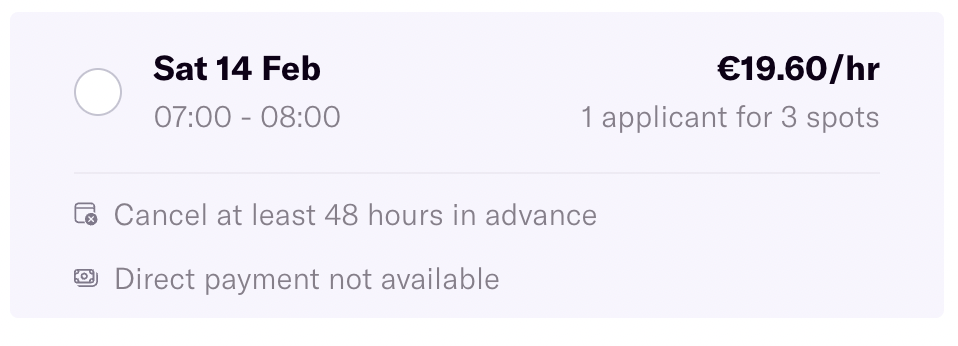
Simple as that! If you do not choose this option, you will receive your money after the client has made the payment.
What is a purchase invoice?
If you chose DirectPay for your freelance shift, you won’t only receive a sales invoice (M). bit you’ll also get a purchase invoice(F) from Finqle for the factoring fees.
These are the costs for DirectPay, an optional service where Finqle takes over your sales invoice and pays you right away, while they wait for the client to pay. The fee is 2.9% of the total amount per shift.
How to understand your purchase invoice
- Page 1: Your company info, Finqle’s details, and the total factoring fees.
- Page 2: A breakdown of the sales invoices (M) Finqle has taken over and the associated fees.
Payment
You don’t have to pay the purchase invoice yourself; the fees are automatically deducted from your sales invoice. You can check the details in your transaction statement (T).
Administration
It’s important to keep the invoices for your records. They count as business expenses and are deductible on your income tax and, if relevant, your quarterly VAT return.
UberEats: how do I get more shifts?
UberEats drivers are assigned to a group based on their performance in the previous week. Your group determines when you can start booking delivery shifts in Planner each week.
Drivers who consistently show up on time, complete their scheduled shifts, and maintain strong reliability metrics get earlier access to Planner.
Your group is updated every week based on three metrics:
- Shift Adherence (SA): How closely your actual online time matches the shift you booked, including late starts, early log-offs, and no-shows.
- On-Time Rate (OTR): How often you arrive at pickups and drop-offs on time.
- End of Shift Acceptance Rate (EOS AR): How often you accept deliveries that may run a few minutes past the end of your scheduled shift.
Waiting at a restaurant or for a customer won't affect your On-Time Rate. Shift Adherence is only measured during your scheduled shift hours in Planner.
The better your scores, the earlier you'll get access to book shifts. So if you'd like to pick up more shifts, keeping your scores high can help you get earlier access the following week. You got this!
What’s the minimum age to work via Temper?
You can start your Temper journey once you turn 18. Even if you're legally allowed to work earlier in the Netherlands, the minimum age to work through our platform is 18.
Not yet 18? We hope to see you on the platform soon!
Help with the M-form for expats
Have you recently moved to the Netherlands or left the country? Then you’ll need to file a special tax return for that year called the M form. The “M” stands for migration. With this form, you report your income for the year, splitting it between the time you lived in the Netherlands and the time you lived abroad.
The M form covers all your income, whether that’s from a job in employment or freelance work.
What information do you need to file the M-form?
Because you immigrated to the Netherlands, the Dutch Tax Administration needs specific information about you, and via the M-form, you can give that to them. The M-form is divided into two parts. The first part of the migration tax return is about the period you were a Dutch resident. The second part is about the period you were living as a non-resident in the Netherlands.
How do you file the M-form?
Since June 2021, you can file the M-form online via “Mijn Belastingdienst”, you need to log in using your DigiD or a European-approved login method (eIDAS). Usually, you have to file your income tax return between the 1st of March and 1st of May. However, for the M-form, it works a little bit differently. You will receive a letter from the Dutch Tax Administration stating that you have to file the M-form. In this letter, you can find your deadline.
What about the following years?
Only for the year that you did not live in the Netherlands for the whole year (e.g., because of migration), you have to file the M-form. For the following years, you can file the ordinary Dutch tax return (called the P-form).
Get help from a tax advisor!
The M-form is an extensive Dutch tax return, and it is only available in Dutch. That makes it even more difficult if you’re not familiar with the Dutch language. If you’re not sure about something, you can always reach out to the Belastingdienst or get help from a tax advisor.
