



Hi, we’re here to help
Find answers to all your questions.
Search results
What am I entitled to if I’m sent home early?
A shift can sometimes end earlier than planned. This can happen, but there are a few rules to keep in mind. These only apply when the company decides to end the shift early.
For employed and freelance shifts, the rules are a bit different.
How do I know if DirectPay will be available for a freelance shift?
Before signing up for a freelance shift, you can always see if DirectPay will be available. If it’s not, this will be clearly shown in the shift details, in the same section where the date and times are listed. As shown below:
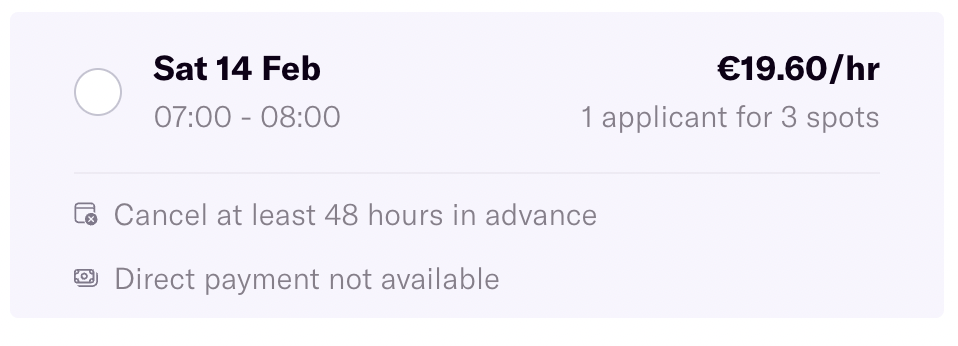
Simple as that! If you do not choose this option, you will receive your money after the client has made the payment.
Can I negotiate the hourly rate for a shift?
You can only negotiate the hourly offered rate for freelance shifts.
How is my salary calculated for employed shifts?
For employed shifts, you’ll get an hourly wage. This can vary depending on the shift. The company offering the shift (hiring company) decides the hourly salary, always following the applicable CAO and minimum wage rules.
The amount you see on the shift page is an estimate of what you’ll earn. This may differ slightly in the end, for example if you work longer or qualify for an additional allowance.
What’s included in the amount you see on the shift page?
- Base wage: This can vary per shift. The hiring company sets the rate based on the CAO for their sector and the minimum wage requirements.
- Holiday pay and holiday hours: For every hour you work, you build up holiday pay (8.33%) and holiday hours. These are paid out directly and therefore included in the hourly wage shown on the shift page. They are listed separately in your contract and on your payslip.
- Allowances for irregular hours: If you work on weekends, at night, or on a public holiday, additional allowances may apply. If so, these are already included in the amount shown on the shift page. You can read more about allowances in this article.
What could be added later?
- Travel allowance: Depending on the CAO, you may receive a travel expense reimbursement. Travel allowance is not taxable income.
- Allowances we couldn’t calculate upfront: Most allowances are known in advance, like working on a public holiday. But sometimes things change, for example if you work overtime and because of that the work takes place partly at night which makes you eligible for an extra allowance.
- Bonuses: Some shifts or companies offer bonuses.
What will be deducted?
- Tax: The hourly rates shown for employed shifts are gross amounts. This means income tax will still be deducted.
- Your pension contribution: Temper pays most of the pension premium. You contribute a small amount per employed shift.
You can always check the full breakdown of your pay for a shift on your payslip.
UberEats: how to start working UberEats shifts
To work Uber Eats shifts, you must first complete an extra verification process. Below, we'll explain how it works in four easy steps.
Good to know before! Unfortunately, it's not possible to work both UberEats shifts and employed shifts for other companies through Temper. After completing the onboarding process, your account will be set up exclusively for UberEats employed shifts.
1. Sign up for an UberEats shift
You don't need to actually work this shift, but signing up is required to get the onboarding process started. Once you've signed up, you'll receive an email with the next steps within four business days.
2. Complete the onboarding
The entire onboarding process takes place online, making it quick and easy. You'll receive all the necessary instructions by email. During onboarding, you'll need to:
- Verify your ID during an at-home appointment with someone from UberEats
- Complete an online training
3. Receive your equipment
During onboarding, you'll order your delivery equipment. To make sure you receive the correct equipment, you'll be asked which vehicle you'll be using for deliveries. You will receive:
- Bicycle or scooter helmet
- Delivery bag
- Phone mount
Within a few business days, it should be delivered. Once that’s done, you can schedule your first shifts.
4. Schedule your shifts through the Uber Driver app
The shifts you see in Temper are only intended to start the onboarding process. Once your onboarding has been completed, you'll schedule all your shifts directly through the UberDriver app.
Do you have any questions? Feel free to contact Support if anything is unclear.
How to create an attractive profile
A strong profile helps you get chosen for more shifts. Make sure your profile looks professional, reliable, and inviting. Here’s how:
Upload a professional photo
Choose a clear picture where you look neat and approachable, for example, wearing smart clothing or in a work setting.
Write a short and powerful bio
In two sentences, explain why you’re great at what you do and what makes you stand out.
Add relevant work experience
Showing your past experience helps to builds trust with the companies.
Keep your profile strong
After your first shift, you’ll receive ratings for attendance, punctuality, and performance. Don’t miss any shifts, and keep up your great work. High ratings will boost your chances of getting the best shifts!
Where can I see / download my invoices and payslips?
For employed shifts, you’ll receive weekly payslips, and for freelance shifts, you’ll receive invoices. You can always view and download them in the financial overview in your profile.
Why is there no final settlement?
A final settlement usually includes any outstanding salary and payment for built-up but unused vacation days. It’s the last financial step when someone leaves a job.
For employed shifts at Temper, that’s not necessary. Each shift has its own separate employment contract and after your shift ends, the contract automatically ends because of the agency clause. Your built-up vacation days are paid out immediately.
A final payroll settlement does not apply to freelancers.
How can I promote my substitute freelance shift via Discord?
Are you looking for a substitute for a freelance shift? You can easily promote your shift in our Temper Community on Discord, where you can connect with other flex workers.
Click on this link to accept the invitation and share your shift link there. You can copy the shift link from the shift page in your dashboard after requesting a substitute.
Are the displayed shift earnings net or gross?
The amounts shown on the shift page are always gross amounts. The amount you ultimately receive may differ, as this depends on the type of shift.
Am I paid if the company cancels my shift?
It’s possible that the company no longer needs you for a shift. They can cancel you last-minute, but you’ll still be entitled to (partial) payment for the cancelled shift. What rules apply depends on the type of shift.
My shift got canceled: how do I check out?
Has the company canceled your shift, but you still need to check out online?
That means the cancellation hasn’t been processed through the platform yet. It’s important that this happens so the cancellation is recorded correctly. For example, this could affect whether you’ll still get paid (part of the) shift, you can read more about that here.
It’s best to contact the company and ask them to cancel you via the platform too.
I don’t want to claim anything
Have you and the company agreed to cancel the shift, or are you choosing not to claim payment out of consideration for the company? You can easily arrange this through the platform.
Go to the shift and click “Report absence.” There, you can indicate that you both agreed to cancel the shift. This will be sent to the company, which can then confirm the cancellation. After they confirm, the shift will be cancelled without any consequences.
